A game MVP, or minimum viable product, is the smallest playable version of your game that proves your core mechanic works. AI tools in 2026 have made it possible to build game MVP with AI in a single weekend, cutting what once took months down to hours. Platforms like Summer Engine and Makko AI generate functional prototypes from plain-language prompts in under 90 seconds with no local setup required. The catch is scope. Without tight constraints on what your MVP includes, AI tools will happily help you build something that never ships.
What tools do you need to build a game MVP with AI?
The right platform determines how fast you move. AI-native engines handle code generation, asset creation, and hosting inside one browser tab. Traditional engines like Godot 4 work well too, but they require you to bring your own AI assistant, such as GitHub Copilot or a large language model like Claude or GPT-4o, alongside the engine.
Here is a comparison of the top platforms for AI-assisted MVP game design in 2026:
| Platform | Best For | Code Export | AI Integration | Ease of Use |
|---|---|---|---|---|
| Summer Engine | Browser-based 2D MVPs | Yes | Built-in | Beginner |
| Makko AI | Prompt-to-game prototypes | Limited | Built-in | Beginner |
| Godot 4 + Claude | Custom logic, cross-platform | Full | External LLM | Intermediate |
| Unity + Copilot | 3D and mobile MVPs | Full | GitHub Copilot | Intermediate |
| GDevelop | No-code 2D games | Yes | Partial | Beginner |
For most indie developers and hobbyists starting out, Summer Engine or Makko AI removes every setup barrier. You open a browser, type a prompt, and get a playable game. For developers who want full code ownership and cross-platform game development flexibility, Godot 4 paired with an external LLM gives you complete control.
Hardware requirements are minimal. Any modern laptop with a stable internet connection handles browser-based platforms. For Godot 4 or Unity, 8 GB of RAM and a mid-range GPU cover most 2D projects comfortably.
Pro Tip: Pick your starting template before you write a single prompt. A platformer template, a top-down shooter template, or a puzzle template gives the AI a structural foundation. You will spend less time correcting basic architecture and more time building what makes your game unique.
How do you prepare your game idea for AI prompting?
The single biggest factor in prototype quality is prompt quality. Detailed briefs specifying core player verbs and unique mechanics consistently produce better prototypes than vague or genre-only prompts. Telling an AI “make a platformer” produces a generic result. Telling it “make a platformer where the player shrinks when they jump and grows when they land, with three platforms and a coin at the top” produces something you can actually test.
The “one prompt, one mechanic” approach is the standard that professional solo developers use. Each prompt should define exactly one behavior, one system, or one rule. This keeps the AI output testable and keeps your build from collapsing under contradictory instructions.
Before you type anything, answer these four questions:
- What does the player do? Name the core verb: jump, shoot, build, match, dodge.
- What is the objective? Reach the exit, survive 60 seconds, collect 10 gems.
- What makes it different? One mechanic that separates your game from a template.
- What game does it feel like? Reference a known title for shared vocabulary with the AI.
Common pitfalls in the role of AI in game idea generation include prompts that describe a genre without describing a mechanic, prompts that list five features at once, and prompts that skip the win/lose condition entirely. Each of these forces the AI to guess, and its guesses rarely match your vision.
Pro Tip: After your first AI output, play it for two minutes before writing another prompt. Note what works and what breaks. Your second prompt should fix one specific problem, not redesign the whole game. Iterative refinement beats one-shot generation every time.
Treat your first prompt like a brief that answers what the player does and why before you type anything else. That mental shift alone separates developers who ship from developers who iterate forever without a playable result.
Step-by-step workflow to prototype and ship your MVP
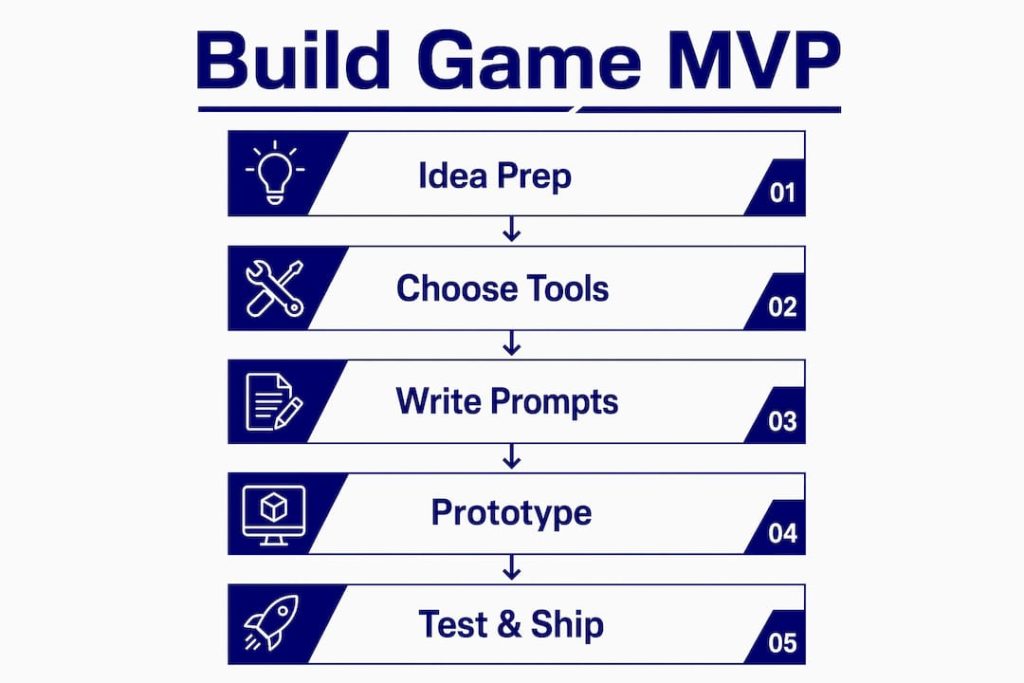
A realistic game MVP takes 10–14 focused hours over a weekend. The time breaks down into three phases: 2 hours for setup, 6–8 hours for core development, and 3–4 hours for polish and export. That structure is not arbitrary. It reflects where most solo projects stall, which is in an endless core build phase with no time left to make the game feel finished.
Here is the workflow that works:
- Set up your environment (2 hours). Choose your platform, pick a template that matches your game type, and write your core mechanic brief. Do not start coding or prompting until you can describe your game in two sentences.
- Build the core loop (6–8 hours). Use one prompt per specific code change and test after every single addition. Add player movement first. Confirm it works. Add collision. Confirm it works. Add the win condition. Confirm it works. Never stack two unverified systems on top of each other.
- Use AI for architecture before writing code. Before you prompt for code, describe the system you want to build and ask the AI to explain how it would structure it. This discussion step catches design problems before they become code problems.
- Gate every feature on a working build. If enemy spawning is broken, do not add weapons. If the jump mechanic has a bug, do not add double-jump. A broken foundation makes every feature built on top of it unreliable.
- Polish and export (3–4 hours). Add sound effects using tools like Sfxr or Bfxr. Add a title screen and a game-over screen. Export to a browser-playable format and generate a shareable link. Platforms like Summer Engine include built-in hosting, so sharing takes seconds.
“Leaving time for a Sunday evening buffer determines whether a project ships or gets abandoned past 90% completion.” This insight from Summer Engine’s 2026 weekend game plan reflects what most solo developers learn the hard way.
Pro Tip: Set a hard cutoff for new features at the end of your core build phase. Write a list of everything you want to add, then cross off everything except the one feature that makes the game playable. Ship that version first. Add the rest later.
What are the common pitfalls in ai-assisted game development?
AI tools introduce failure modes that traditional development does not. The most common is building a complex but functionally broken system because the AI generated architecturally elegant code that does not actually run correctly. The code looks right. The structure looks clean. But the game does not work.
Watch for these specific problems:
- Scope creep disguised as features. Every new idea feels small until you realize you have added six systems and none of them are finished.
- AI hallucinations in code. The AI references functions or libraries that do not exist. Always run generated code before building on top of it.
- Vague outputs from vague prompts. If the AI gives you something generic, the problem is almost always in your prompt, not the AI.
- Reverting vs. patching. When an AI-generated change breaks something, revert to the last working build before attempting a fix. Patching broken AI code with more AI code compounds the problem.
Maintaining creative control while using AI means treating the AI as a capable contractor, not a creative director. You decide what the game is. The AI helps you build it faster. AI acts as a multiplier that covers more development ground, but human taste and playtesting remain non-negotiable.
Pro Tip: Playtest after every major build step, not just at the end. Five minutes of playing your own game reveals more bugs than an hour of reading AI-generated code.
Scope discipline is the single biggest factor in whether an indie MVP ships. Most successful indie developers focus on a “weekend win” minimal version rather than attempting full features at once. That constraint is not a limitation. It is the strategy.
Key takeaways
Building a game MVP with AI works when you combine tight scope, specific prompts, and a test-after-every-step workflow.
| Choose the right platform | Summer Engine or Makko AI for beginners; Godot 4 with Claude for full code control. |
| Write specific prompts | Name the player verb, objective, and one unique mechanic before prompting. |
| Follow the time breakdown | Allocate 2 hours setup, 6–8 hours core build, and 3–4 hours polish to ship on time. |
| Gate features on working builds | Never add a new system until the previous one is verified and functional. |
| Playtest continuously | Test after every build step to catch broken foundations before they compound. |
AI is a multiplier, not a game designer
I have spent a lot of time watching developers hand the creative wheel entirely to AI and then wonder why their game feels hollow. The tools are genuinely impressive. Summer Engine can produce a playable prototype faster than most people can write a design document. But impressive speed does not equal good game design.
What I have found is that AI works best when you already know what you want to make. The clearer your vision, the better the AI performs. When you are vague, the AI fills the gaps with generic decisions. Those decisions are technically correct but creatively empty.
The developers I see ship the most interesting MVPs treat AI like a very fast junior developer. They make every design call themselves. They use AI to write the boilerplate, generate the assets, and handle the repetitive code. Then they play the result, form an opinion, and give the AI a precise new instruction. That loop, repeated 20 or 30 times over a weekend, produces something worth sharing.
The role of AI in generating game myths is real too. There is a persistent idea that AI can replace the need for game design instincts. It cannot. What it can do is remove the technical barriers that used to stop non-programmers from testing their ideas. That is genuinely valuable. Use it for that.
— Adrian
Start building faster with Gamedevaihub
If you are ready to move from reading to building, Gamedevaihub is built specifically for this moment in your development process.
Gamedevaihub collects the best AI tools for game development, tested by real indie developers in 2026, alongside practical tutorials and prompt libraries designed for every stage of your MVP build. Whether you are picking your first platform, writing your first prompt, or trying to debug a broken AI-generated system, the Hub gives you tested answers instead of generic advice. The community-driven comparisons mean you spend less time researching and more time building. Visit Gamedevaihub and find your next step.
FAQ
How long does it take to build a game MVP with AI?
A focused developer can build a playable game MVP in 10–14 hours over a weekend. The breakdown is 2 hours for setup, 6–8 hours for core development, and 3–4 hours for polish and export.
What is the best AI tool to create a game prototype?
Summer Engine and Makko AI are the fastest options for beginners, generating playable prototypes in under 90 seconds from a plain-language prompt. Godot 4 paired with Claude or GPT-4o gives intermediate developers full code ownership and cross-platform flexibility.
How do i write a good AI prompt for game development?
Specify the core player verb, the win condition, and one unique mechanic in every prompt. Reference a known game for shared vocabulary, and limit each prompt to one specific system or behavior change.
Why do ai-generated game builds break so often?
AI tools produce architecturally plausible code that sometimes references nonexistent functions or creates systems that conflict with each other. Testing after every single build step and reverting to the last working version when something breaks prevents compounding failures.
Can AI replace a game designer for an MVP?
AI accelerates development but does not replace design judgment. Human taste, playtesting instincts, and creative decisions remain the developer’s responsibility. AI handles the execution; you supply the vision.