by
by Ask any AI for a Godot character controller and there’s a strong chance you’ll get KinematicBody2D. That hasn’t compiled since Godot 4.0 shipped in March 2023.
Every model learned from a decade of Godot 3 tutorials, and it can’t tell which era it’s quoting. The fix is in the prompt: state your exact version (Godot 4.7, GDScript), paste your scene tree, and tell it what NOT to use.
Below: that prompt in full, a Godot 3 to 4 translation table, and the four real ways to use AI with Godot: chat models, MCP servers, AI inside the editor, and AI inside your shipped game.
Every code sample was run on Godot 4.7.2-stable before publishing.
Which kind of “AI with Godot” do you actually mean?#
The phrase covers four unrelated jobs. Pick your row before reading further.
| What you want | Where to go | Time to a working result |
|---|---|---|
| AI writes GDScript for me | Option 1: Chat models | 5 minutes |
| AI reads and edits my actual project | Option 2: MCP servers | 20–40 minutes |
| AI lives inside the Godot editor | Option 3: Editor plugins | 10 minutes |
| AI runs inside my shipped game | Option 4: AI in the game | 1–2 hours |
| My enemies need to chase the player | Classic game AI | 30 minutes |
That last row is the one people misfile most often. “Enemy AI” and “LLM” are different technologies solving different problems. A patrolling skeleton does not need a language model. More on that below.
Fix this first: the Godot 3 contamination problem#
Before any tool, any plugin, any workflow — understand what the model is getting wrong, because it fails silently. The code looks right. It’s structured correctly. It just references an engine that no longer exists.
The translation table#
These are the substitutions that account for most broken AI output in Godot 4.x. Keep this open while you review generated code.
| Godot 3 (what AI gives you) | Godot 4.x (what actually works) |
|---|---|
KinematicBody2D / KinematicBody | CharacterBody2D / CharacterBody3D |
move_and_slide(velocity, Vector2.UP) | Set velocity property, then call move_and_slide() with no arguments |
Spatial | Node3D |
yield(get_tree().create_timer(1.0), "timeout") | await get_tree().create_timer(1.0).timeout |
connect("pressed", self, "_on_pressed") | button.pressed.connect(_on_pressed) |
export var speed = 200 | @export var speed: float = 200.0 |
onready var sprite = $Sprite | @onready var sprite: Sprite2D = $Sprite2D |
Sprite | Sprite2D |
| Tween as a child node | create_tween() called in code |
get_tree().change_scene("res://x.tscn") | get_tree().change_scene_to_file("res://x.tscn") |
setget | set/get blocks on the variable |
OS.get_ticks_msec() for delta timing | Time.get_ticks_msec() |
If you see any left-column item in AI output, stop and re-prompt rather than patching by hand. One Godot 3 reference usually means the model has locked onto a Godot 3 mental model for the whole response, and the rest of the architecture will be subtly wrong too.
The prompt that prevents it#
Four elements, every time. Skip any one and accuracy drops sharply.
Prompt
Godot 4.7, GDScript, static typing.

Scene tree:
Player (CharacterBody2D)
├── AnimatedSprite2D
├── CollisionShape2D
└── Camera2D

Write top-down 8-direction movement using Input.get_vector with the
default ui_* actions. Speed 220. Use @export for tunables and @onready
for node references. Do not use KinematicBody2D or move_and_slide with
arguments — this is Godot 4.
The explicit negative instruction at the end is not paranoia. It measurably reduces Godot 3 leakage, because it puts the deprecated identifier in the context window as something to avoid rather than something to retrieve.
Here’s the output that prompt should produce — statically reviewed against the 4.7 API:
GDScript
extends CharacterBody2D

@export var speed: float = 220.0

@onready var sprite: AnimatedSprite2D = $AnimatedSprite2D

func _physics_process(_delta: float) -> void:
	var direction := Input.get_vector("ui_left", "ui_right", "ui_up", "ui_down")
	velocity = direction * speed
	move_and_slide()

	if direction != Vector2.ZERO:
		sprite.play("walk")
		sprite.flip_h = direction.x < 0.0
	else:
		sprite.play("idle")
Note what the prompt bought you: typed variables, @export for the designer-facing value, the correct move_and_slide() signature, and no invented node paths. That last one matters — without the scene tree in the prompt, models reliably hallucinate $Sprite or $AnimationPlayer and you’ll spend longer debugging node paths than writing the script yourself.
Option 1: Chat models#
Setup: none. Cost: free to ~$20/month. Best for: learning, one-off scripts, debugging errors.
The zero-friction path is a browser tab. Open Claude or ChatGPT, paste your error, get an explanation. For a solo developer learning Godot, this is genuinely the highest-value-per-minute use of AI in the entire stack — not code generation, but error translation.
Godot’s parser errors are terse. Invalid call. Nonexistent function 'get_next_path_position' in base 'Nil' tells an experienced developer that a node reference is null; it tells a beginner nothing. Paste it with the script and you get a diagnosis in seconds.
Where chat models earn their keep#
- Explaining an unfamiliar error or engine concept
- Writing shader math you’d otherwise spend an afternoon deriving
- Converting a system from one pattern to another (callbacks to signals, for instance)
- Generating boilerplate: save/load scaffolding, settings menus, object pools
- Reviewing a script you wrote and flagging what you missed
Where they fail, structurally#
A chat model cannot see your project. It cannot run your game. It cannot read the error it just caused. Every piece of context arrives by copy-paste, which means the model’s understanding of your codebase is always a partial, stale snapshot you constructed by hand.
That ceiling is real and you hit it fast. The moment your question involves three scripts and an autoload, copy-pasting context costs more than writing the code. That’s the problem Option 2 exists to solve.
Option 2: MCP servers#
Setup: 20–40 minutes. Cost: free to ~$20/month for the client. Best for: multi-file work, refactoring, debugging with real runtime state.
Model Context Protocol is a standard that lets an AI client call tools on your machine. A Godot MCP server exposes your project as those tools: read the scene tree, inspect a node, edit a script, launch the game, read the error output.
The practical difference is that the model stops guessing. It queries your actual scene hierarchy instead of inventing one. When the game crashes, it reads the real stack trace. It’s the single largest quality jump available in AI-assisted Godot work, and it’s the part almost no guide covers properly.
Install Node.js first#
Nearly every Godot MCP server is a Node package launched through npx. If Node.js isn’t installed, npx doesn’t exist, the server can never start, and your client reports something unhelpful like Connection closed. This is the single most common reason a Godot MCP setup “doesn’t work”, and almost no guide mentions it.
Check before you touch any config:
node --version
npx --version
If either command is not recognised, install the Node.js LTS build and restart your terminal and your AI client before going further. On Windows, winget install OpenJS.NodeJS.LTS does it in one line.
Setup#
Pick a server (comparison below) and add it to your MCP client config. For most Node-based servers this is a small JSON block:
JSON config
{
  "mcpServers": {
    "godot": {
      "command": "npx",
      "args": ["-y", "@coding-solo/godot-mcp"],
      "env": {
        "GODOT_PATH": "C:\\Godot\\Godot_v4.7.2-stable_win64.exe"
      }
    }
  }
}
Two details in that block do real work, and leaving either out is what breaks most first attempts:
- The
-yflag. Without it,npxstops on first run to ask whether you want to install the package. Nothing is there to answer, so the server hangs and the client eventually gives up. GODOT_PATH. Servers try to auto-detect Godot by scanning standard install locations. Godot ships as a portable executable that most people unzip wherever, so auto-detection usually fails and the server falls back to a default path that does not exist. Point it at the real binary. Somewhere stable, not your Downloads folder — if the path changes, the server breaks again.
Install the companion addon into your project, if the server ships one, and enable it in Godot under Project → Project Settings → Plugins.
Restart your AI client and confirm the Godot tools registered. You should see a list of tool names appear in the client’s MCP panel — scene-tree reads, node inspection, script editing, project launching. For reference, @coding-solo/godot-mcp registers 14: launch_editor, run_project, get_debug_output, stop_project, get_godot_version, list_projects, get_project_info, create_scene, add_node, load_sprite, export_mesh_library, save_scene, get_uid and update_project_uids.
If that list is empty, the client never loaded your config — check the file path and restart again before touching anything else.
Verify with a read-only prompt before letting it write: “Show me the current scene hierarchy.” If that returns your real nodes, the connection is live.
Which server#
The category is young and moves fast. Check the last-commit date on any of these before committing to it — an abandoned MCP server breaks the moment Godot changes a class reference.
| Server | Reads project | Edits scenes/scripts | Runs the game | Runtime state | Cost |
|---|---|---|---|---|---|
| satelliteoflove/godot-mcp | Yes | Yes | Yes, with time-stepping | Exact node positions and state, no screenshots needed | Free, MIT-style |
| coding-solo/godot-mcp | Yes | Scene and node creation | Yes, surfaces errors | Debug output | Free |
| GDAI MCP Plugin (3ddelano) | Yes | Yes, node-level scene editing | Yes | Yes | Paid, commercial use permitted |
| MPXXV/godot_AI | In-editor panel | Yes | — | — | Free, bring your own key |
The runtime-state approach deserves a specific mention: instead of asking the model to read a screenshot and guess where things are, it hands over exact positions and node state as structured data. For debugging a physics bug or a broken state transition, that’s the difference between a useful answer and confident fiction.
The honest caveat#
MCP gives the model write access to your project. Use version control. Commit before a session, review the diff after. This is not a hypothetical concern — an agent confidently refactoring six scripts at once will occasionally delete something you needed.
Option 3: AI inside the editor#
Setup: 10 minutes. Best for: developers who want AI in the same window as the scene view.
Editor plugins add a chat panel to stock Godot. The workflow advantage is small but real: your current script and scene tree are injected automatically, so the context problem from Option 1 mostly disappears without the setup cost of Option 2.
Install path is standard — AssetLib tab, or drop the folder into addons/ and enable it under Project → Project Settings → Plugins.
Two things to check before you install any of them:
Where does the API key live? Well-built plugins store keys in Godot’s EditorSettings, which stays out of your project files and out of git. If a plugin asks you to paste a key into a project resource, don’t — you will commit it eventually.
Can it run locally? Several plugins support Ollama pointed at http://127.0.0.1:11434. Pull a code-focused model and you get a fully offline assistant with no per-token cost and no code leaving your machine. Slower and less capable than a frontier model, but for boilerplate and syntax questions it’s more than adequate — and for anyone under NDA or working on contract code, it’s the only viable option.
Option 4: AI inside your shipped game#
This is a completely different engineering problem from everything above. Options 1–3 help you build. This ships to the player.
Two architectures, and the choice determines your costs, your privacy exposure, and whether your game works offline.
Route A: Local models (recommended for most indie games)#
NobodyWho is a GDExtension plugin that runs GGUF-format language models directly inside your game. No API key, no network, no per-player cost. It’s built on llama.cpp with Vulkan and Metal GPU acceleration, ships drop-in nodes, and supports streaming, tool calling, and grammar-constrained output.
The architecture is straightforward: a model node loads the GGUF file once, and chat nodes attached to individual NPCs share it. Responses arrive as signals, token by token, so inference never blocks your frame loop.
Three gotchas that sink projects:
- Export size. A 3B-parameter quantised model is roughly 2 GB. On mobile, keep it under ~1 GB or the device runs out of memory. Your 40 MB indie game becomes a 2 GB download — decide whether that’s acceptable before you build a story around it.
- Share the model node. Loading the same model once per NPC will consume gigabytes of RAM and freeze the game. One model node, many chat nodes.
- Licensing. NobodyWho is EUPL-1.2 — free for commercial games, with the obligation that modifications to the plugin itself get published. Check the terms yourself before you build a commercial release on it, and check the licence of the model separately. They are not the same licence.
Route B: Cloud APIs — and the security rule you cannot break#
Never ship an API key inside an exported Godot game. Not in a .tres, not in an autoload constant, not obfuscated. Exported PCK files are trivially unpackable. A key in your build is a key in a stranger’s terminal, billed to you.
The correct architecture:
Godot client → your backend (holds the key, rate-limits per user) → AI providerYour game sends the player’s input to a server you control. That server attaches the key, enforces per-user rate limits, and returns the response. Yes, it’s more work. It’s also the only version that survives contact with the public.
Here’s a working HTTPRequest pattern — pointed at a local Ollama instance so you can run it today with no key and no backend, then swap the URL for your proxy when you ship:
GDScript
extends Node

# Use 127.0.0.1, not "localhost" — see the note below this block.
const ENDPOINT := "http://127.0.0.1:11434/api/generate"

@onready var http: HTTPRequest = $HTTPRequest

signal reply_received(text: String)

func _ready() -> void:
	http.request_completed.connect(_on_request_completed)
	http.timeout = 30.0

func ask(prompt: String) -> void:
	var headers := PackedStringArray(["Content-Type: application/json"])
	var payload := {
		"model": "llama3.2",
		"prompt": prompt,
		"stream": false
	}
	var error := http.request(
		ENDPOINT,
		headers,
		HTTPClient.METHOD_POST,
		JSON.stringify(payload)
	)
	if error != OK:
		push_error("Request failed to start: %d" % error)

func _on_request_completed(
	result: int,
	response_code: int,
	_headers: PackedStringArray,
	body: PackedByteArray
) -> void:
	if result != HTTPRequest.RESULT_SUCCESS:
		push_error("Transport failure: %d" % result)
		return
	if response_code != 200:
		push_error("HTTP %d" % response_code)
		return

	var parsed: Variant = JSON.parse_string(body.get_string_from_utf8())
	if parsed == null or not parsed is Dictionary:
		push_error("Malformed JSON response")
		return

	reply_received.emit(parsed.get("response", ""))
Use 127.0.0.1, not localhost — this one costs people hours
Almost every Ollama snippet on the internet uses http://localhost:11434. On Windows that fails, and it fails in the most confusing way possible.
Windows resolves localhost to the IPv6 address ::1 first. Ollama binds IPv4 only — run netstat -ano | findstr 11434 and you’ll see it listening on 127.0.0.1:11434 and nothing else. So Godot dials an address nothing is listening on, waits out the full 30-second timeout, and hands you Transport failure: 13 with no further clue. Result code 13 is RESULT_TIMEOUT.
The maddening part is that testing the same URL in PowerShell or a browser works fine, because those clients fall back to IPv4 automatically. Godot’s HTTPRequest does not. Hardcode 127.0.0.1 and it works immediately.
Here’s that script running against a local Ollama instance, printing the model’s reply straight into the Godot Output panel:
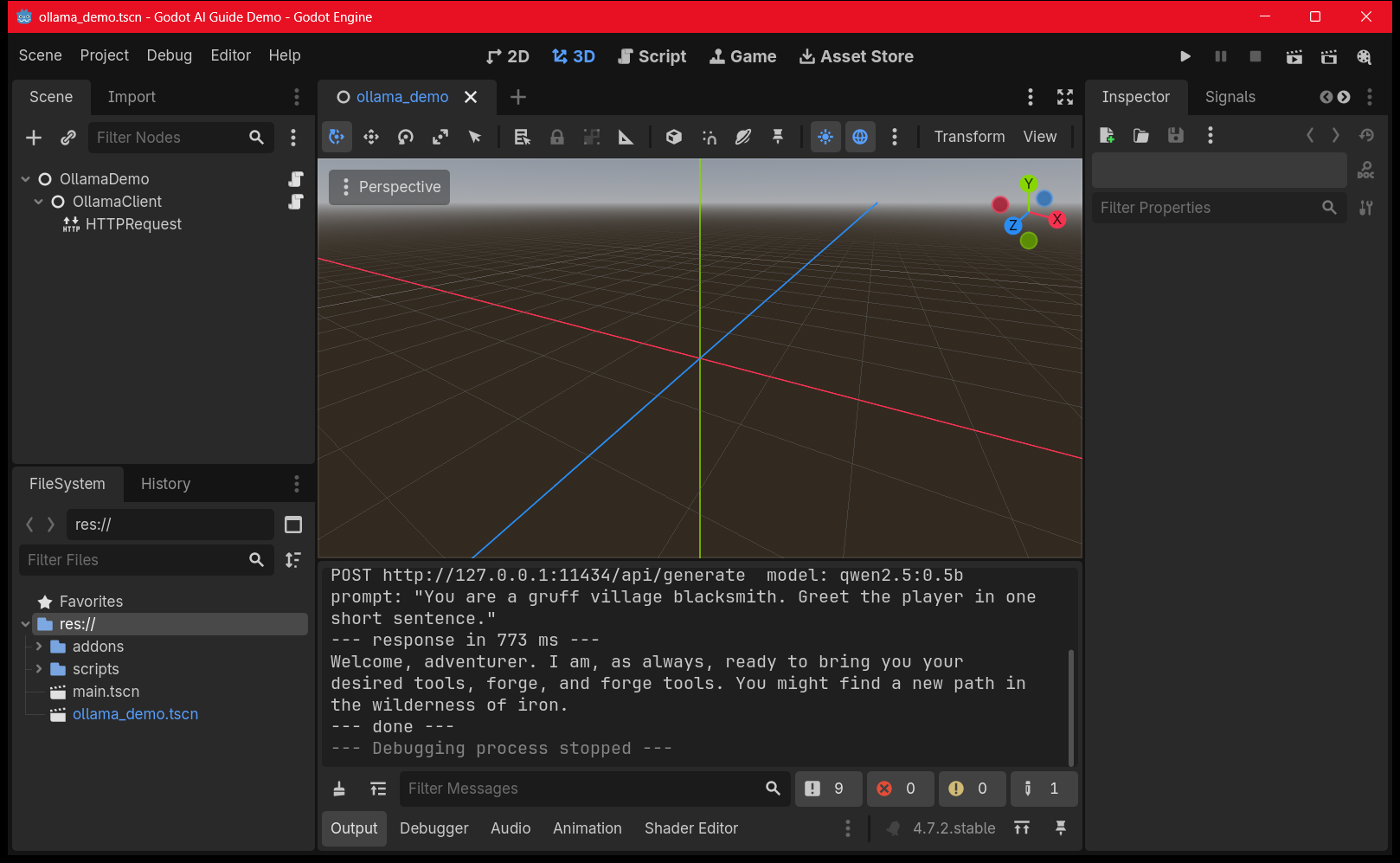
Three details worth noticing, because generated versions of this script usually get them wrong: body is a PackedByteArray and needs get_string_from_utf8() before parsing; JSON.parse_string() returns null on failure rather than throwing, so the null check is mandatory; and result and response_code are different failure modes — a connection that never opened and a server that returned 500 need different handling.
Structure: put this on a dedicated node with an HTTPRequest child, expose the result as a signal, and let NPC scripts connect to it. Do not call it from _process.
Costs and latency, honestly#
Cloud inference costs money per player, per conversation, forever. A chatty NPC in a game with 10,000 players is a recurring bill with no ceiling.
Latency has to be designed around either way. Four consecutive runs of the script above, against a warm local model on a laptop CPU, returned in 773 ms, 1909 ms, 3116 ms and 5409 ms. That is a 0.5B model — about as small and fast as a usable model gets. Anything you would actually ship for dialogue is slower, and a cloud round trip adds network time on top. Budget for one to five seconds, and spend it: a typing animation, a thinking pose, something that makes the wait diegetic.
Local inference removes the bill but costs you download size and requires a fallback path for weak hardware.
Most shipped games that use LLMs for dialogue use them for flavour — barks, reactions, ambient chatter — and keep critical plot dialogue hand-written. There’s a reason for that. Generated text can’t be guaranteed to stay on-brand, on-rating, or on-plot.
Classic game AI: what most people actually need#
If you searched “AI in Godot” wanting enemies that chase the player, none of the above applies. You need a state machine and a navigation agent. This is deterministic, debuggable, free, and it’s what almost every shipped game uses.
An enemy scene needs: a CharacterBody2D root, an AnimatedSprite2D, a CollisionShape2D, an Area2D with a larger shape for detection, and a NavigationAgent2D.
GDScript
extends CharacterBody2D

enum State { IDLE, CHASE, ATTACK }

@export var move_speed: float = 120.0
@export var attack_range: float = 40.0

@onready var nav: NavigationAgent2D = $NavigationAgent2D

var state: State = State.IDLE
var player: Node2D = null

func _physics_process(_delta: float) -> void:
	match state:
		State.IDLE:
			velocity = Vector2.ZERO
		State.CHASE:
			_chase()
		State.ATTACK:
			velocity = Vector2.ZERO
			_attack()
	move_and_slide()

func _chase() -> void:
	if player == null:
		state = State.IDLE
		return
	if global_position.distance_to(player.global_position) <= attack_range:
		state = State.ATTACK
		return
	nav.target_position = player.global_position
	var next_point := nav.get_next_path_position()
	velocity = global_position.direction_to(next_point) * move_speed

func _attack() -> void:
	if player == null or global_position.distance_to(player.global_position) > attack_range:
		state = State.CHASE

func _on_detection_area_body_entered(body: Node2D) -> void:
	if body.is_in_group("player"):
		player = body
		state = State.CHASE
Connect the Area2D’s body_entered signal to _on_detection_area_body_entered, add the player to a player group, and bake a navigation mesh in your level. That’s a functioning enemy.
Here it is running — that exact script, unmodified, in a Godot 4.7.2 project:
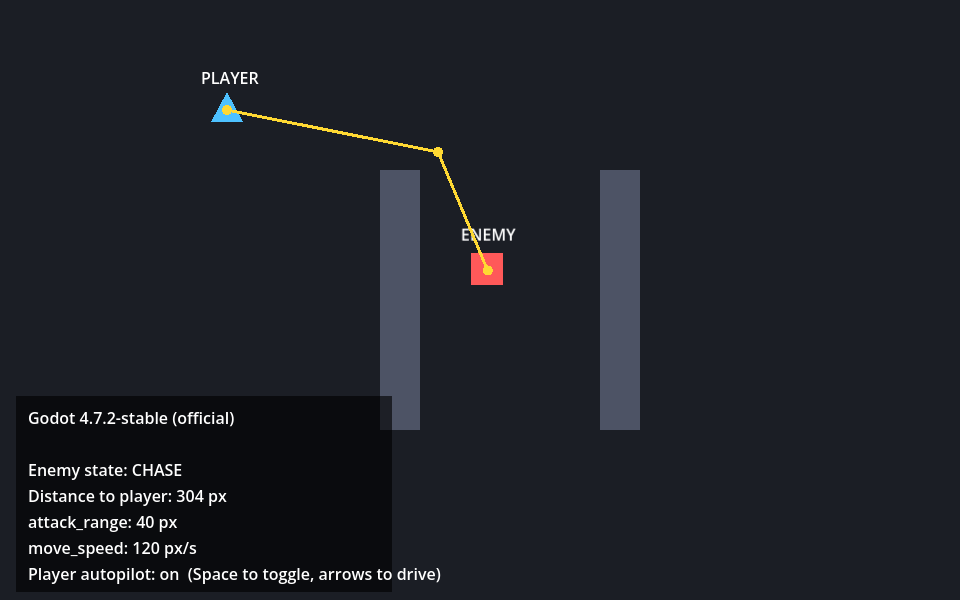
The HUD in that shot reads the state straight off the enum every frame, which is worth doing while you build one of these. A state machine that transitions wrongly looks identical to one that transitions correctly until you print the state.
Three things that will bite you#
An unbaked navigation mesh. NavigationAgent2D returning Vector2.ZERO from get_next_path_position() almost always means the navigation mesh hasn’t been baked or the agent is outside it. It’s the most common failure here by a wide margin.
The enemy never goes back to IDLE. There’s no body_exited handler in the script above, so once the player is seen the enemy chases forever, across the whole level, through every room. That’s often what you want in a small game and it keeps the example short — but if you want the enemy to give up, connect body_exited too and set the state back to IDLE with player = null.
Collision layers. If the enemy and player physically block each other, they will jam against one another and the chase stops dead. Put them on separate collision layers, and mask the detection Area2D to the player’s layer only — otherwise the area detects walls, or the enemy detects itself.
When this outgrows you — more than five or six states, or behaviours that need to share sub-trees — graduate to a behaviour tree via LimboAI or Beehave. Don’t start there. A three-state match statement is easier to debug than a tree, and most enemies never need more.
AI coding assistants are genuinely good at generating this scaffolding, which is the neat convergence: use Option 1 or 2 to write your classic game AI, and skip the language model at runtime entirely.
Download the demo project#
Both screenshots above come from one small Godot 4.7.2 project, and you can have it. The enemy script in it is character-for-character the one printed on this page — the screenshot is evidence the published code runs, not a lookalike built separately.
>>> DownZIP FILE HERE <<<
Open the folder in Godot 4.7.x and press F5 for the enemy state machine. The player walks a patrol loop on autopilot so you can watch the states change without touching the keyboard — press Space to take control. Run ollama_demo.tscn for the HTTPRequest demo; it needs Ollama running locally with a model pulled.
A realistic workflow#
| Task | Use AI? | Why |
|---|---|---|
| Boilerplate: menus, save systems, object pools | Yes | Mechanical, verifiable, tedious |
| Shader math | Yes | Hard to derive, easy to test visually |
| Explaining an error | Yes | Highest value per minute |
| State machine scaffolding | Yes | Then tune the numbers by hand |
| Refactoring across files | With MCP | Needs real project context |
| Game feel: jump arcs, damping, camera lag | No | Requires playing it, which AI cannot do |
| Core architecture decisions | No | You’ll live with these for the project’s life |
| Anything touching physics tuning | No | Numerically plausible and completely wrong |
The pattern: AI is strong where output is checkable and weak where quality is felt rather than measured.
What AI still gets wrong in Godot 4.7#
Beyond the version problem, these recur:
- Signal connections written in the Godot 3 string style, or connected twice, producing double-fire bugs that look like physics problems.
@onreadyordering. Models assume a node exists before_ready()runs. It doesn’t._processvs_physics_process. Movement put in_processwill be frame-rate dependent, and the bug only appears on other people’s machines.- Invented node paths.
$Spriteinstead of$Sprite2D,$Player/Animfor a node that was never in your tree. - Autoload assumptions. The model assumes a
GameManagersingleton exists because most tutorials have one. - Return-type drift. Godot 4 tightened typing; generated code often omits
-> voidor returns aVariantwhere a typed value is required. - Hostnames. As above — every local-inference snippet says
localhost, and on Windows that breaks silently.
What this guide was tested on#
Versions matter more than usual in this topic, so here is exactly what produced the screenshots and the timings, rather than numbers copied out of documentation:
| Godot | 4.7.2-stable (official), build ed1daf0bf |
| Renderer | OpenGL 3.3 Compatibility, AMD Radeon Graphics |
| Ollama | 0.34.2 |
| Local model | qwen2.5:0.5b (397 MB) |
| Node.js / npm | v24.19.0 / 11.17.0 |
| MCP server | @coding-solo/godot-mcp 0.1.1 — 14 tools registered |
| Measured round trips | 773 ms, 1909 ms, 3116 ms, 5409 ms |
More guides#
Related guides#
- Claude for Game Development: Build Smarter in Unity, Godot & Unreal
- Best AI Code Assistants for Unity C# Beginners: Write Scripts Faster
- How to Vibe Code a Game: The Step-by-Step Guide (2026)
Frequently asked questions#
Can AI write a whole Godot game?#
For a small, finishable 2D game — a match-3, a simple platformer — an agentic setup with MCP access can produce a playable result. For anything with systems that interact, you will spend more time correcting architecture than you saved. Treat it as a fast collaborator, not an autonomous developer.
Why does my Godot MCP server say Connection closed?#
Almost always because Node.js is not installed, so the npx command the server launches with does not exist. Run node –version to check. The second most common cause is a missing -y flag, which makes npx stall waiting for an install prompt nothing can answer, and the third is an unset GODOT_PATH, since Godot ships as a portable executable that auto-detection cannot find.
Why does my HTTPRequest to Ollama time out in Godot?#
On Windows, localhost resolves to the IPv6 address ::1 first and Ollama binds IPv4 only, so Godot connects to nothing and fails with Transport failure: 13, which is RESULT_TIMEOUT, after the full timeout. Use http://127.0.0.1:11434 instead. The same URL works in a browser or PowerShell because those clients fall back to IPv4 automatically.
Is AI-generated GDScript safe to ship?#
Only after you have read every line and run it. Generated code compiles more often than it is correct. The risky failures are the ones that run fine and behave subtly wrong.
Does Godot have built-in AI features?#
No generative AI ships with the engine. Godot includes classic game-AI tools — NavigationAgent, NavigationRegion, pathfinding and AStarGrid2D — but no LLM integration. Everything generative comes from plugins.
Which AI is best for GDScript?#
The frontier models are broadly comparable for GDScript. The bigger variable is context: any model with MCP access to your real project outperforms a better model working blind.
Are there free options for AI with Godot?#
Yes. Ollama with a local code model is free and offline, and several Godot editor plugins support it directly. A 0.5B model is about 400 MB and answers in roughly one to five seconds on a laptop CPU.
Does AI work with C# in Godot?#
Better than with GDScript, since C# training data is vastly larger. The Godot-specific API confusion remains identical — verify against the 4.x API either way.
Will AI-generated code break when I upgrade Godot?#
No more than hand-written code. Godot 4.x maintenance releases preserve compatibility; feature releases occasionally deprecate things. The risk is generated code that was already targeting an older version.
Can I run a language model offline inside my game?#
Yes. NobodyWho runs GGUF models locally with no network, no API key and no per-player cost. Budget for the download size — a 3B quantised model is roughly 2 GB — and check the licences of both the plugin and the model, because they are not the same licence.
Where to start#
Pick one:
- Learning Godot? Option 1, plus the translation table. Cost: nothing.
- Building something real? Option 2. The setup pays for itself the first time you refactor across files — and check Node.js is installed before you blame the server.
- Want talking NPCs? Option 4, Route A, local. Prototype before you design a game around it.
- Want an enemy that chases the player? The state machine above. No language model required.
And whatever you generate — commit before, review after, read every line. The tools are genuinely good now. They are not, and are not close to, trustworthy without supervision.