by
by I vibe coded a playable 3D game in one night. By morning, the same AI had broken it so badly I started over.
That’s vibe coding. AI gets you 70% of the way fast, then every fix breaks something else. The people who ship follow four habits: a one-page design doc before the first prompt, a toy instead of “build me a complete game,” one change per prompt, and a Git commit after every working build.
Browser game in Three.js or Phaser? You can ship one tonight. Multiplayer, save systems or Steam? That’s where it breaks. Here’s the exact process for both.
Tested June 2026, updated October 2026. Tool versions and prices cited inline, verify before you subscribe. Some tool links are affiliate links: I earn a commission if you buy, at no extra cost to you.
What is vibe coding a game?#
Vibe coding a game means describing the game you want in plain English and letting an AI coding agent write the code while you steer, test, and refine through follow-up prompts. Andrej Karpathy coined the term in February 2025.
The longer truth matters for what you are about to do. Karpathy’s original post called it fine for “throwaway weekend projects” and admitted “it’s not really coding.” He was right. Vibe coding works beautifully for browser games built on JavaScript libraries the AI knows cold, Three.js for 3D, Phaser or HTML5 canvas for 2D. It works far worse for multiplayer netcode, save systems, and anything bound for Steam. I will show you exactly where that line sits.
How to vibe code a game, step by step#
The single biggest mistake beginners make is typing “build me a complete game” into one prompt. You get a tangled pile of code nobody can fix. Ask for a toy, then grow it. Here is the loop I actually run.
Step 1: Write a one-page design doc first. Do not open Cursor yet. Open ChatGPT, Claude, or Grok, describe your idea, and have it write a short Game Design Document in Markdown: what the player does second to second, the win and lose conditions, the art style, the controls. Save it as game-design-document.md. A good plan is worth ten times its weight in debugging time.
Step 2: Lock the tech stack. Ask your model for the simplest robust stack, not the fanciest. For 3D that is almost always Vite plus Three.js. For 2D it is Phaser or plain HTML5 canvas. Save it as tech-stack.md. Models love to over-engineer, so the word “simplest” is doing real work here.
Step 3: Generate the first playable. Paste your design doc into your agent and ask for the core mechanic only. Your spaceship will be a white box and your enemies will be triangles. That is correct. You want the loop running, not the art. Open it in your browser and play it.
Step 4: Iterate with micro-prompts. One small, testable change at a time. Not “make it fun,” but “make the player jump higher when I hold space.” Force visible state early: a score, a timer, a health bar. Anything you can see is something you can debug. Ask the AI to put tuning values like enemy speed and spawn rate at the top of the file as variables you can tweak.
Step 5: Commit every working build. This is the rule that separates people who ship from people who quit. The moment something works, commit it to Git. When the next prompt breaks three things, you revert in one second instead of crying at 2 a.m. Start a fresh chat for each new feature so you do not bloat the AI’s memory.
Step 6: Debug, then ship. Run a cleanup pass (“list any duplicate code”), a quick security pass, and a performance pass. For a browser game, deploy is one static file on its own domain. That is the entire bar for the Vibe Jam.
A real game is not one prompt. Nicolas Zullo built a multiplayer 3D dogfight game and posted the receipts: “20 hours. 500 prompts. 20 euros.” He used Cursor with Claude for the code and Grok for planning. The “one-shot a game” headline is marketing. The truth is 500 small, smart prompts.
Best vibe coding tools for games#
Pick by your skill and your goal, not by what is trending. Prices are mid-2026 and move constantly, so confirm before you pay. I keep a fuller breakdown in my best AI game development tools guide; here is the short version for vibe coding specifically.
Cursor, the workhorse if you want to own the code. An AI-native IDE forked from VS Code, with Agent mode, background agents, and its own Composer model alongside Claude and GPT. Free Hobby tier, Pro at $20/month, Pro+ at $60, Ultra at $200. Best when you want to read the code and catch the AI lying.
Bolt.new, the fastest browser prototype. Runs a full stack in the browser and ships to a public URL with no setup. Free tier around 150K tokens a day, Pro at $20 to $25/month. Type your idea, watch it build and run live. It is a Vibe Jam 2026 sponsor for a reason.
Rosebud AI, the most beginner-friendly. Built specifically to vibe code 2D, 3D, and multiplayer games with no coding experience. You talk to an assistant and get a shareable URL. Rosebud ships Flappy Bird and Pong starter tutorials precisely because the first prompt is a starting point, not a finished game. Best for “I have a Friday night and an idea.”
Replit Agent, generation plus hosting plus database in one tab. Readable HTML5 and JavaScript you can edit, around $20 to $25/month. One caution: in July 2025 SaaStr founder Jason Lemkin reported that Replit’s agent deleted a production database during an explicit code freeze, then lied about it. Never give any agent unsupervised access to something you cannot afford to lose.
GDevelop’s AI Agent, no-code and you keep ownership. A free open-source engine where the agent generates editable visual events instead of opaque code, so you can actually read the logic. Free plan includes 40 AI credits a month; failed requests do not burn credits. Exports to web, mobile, and Steam.
If you like watching an agent drive the browser for you while you supervise, Godmode steers a build through a browser editor.
Tool comparison#
| Tool | Output | Stack | Free tier | Paid (mid-2026) | Best for |
|---|---|---|---|---|---|
| Cursor | Editable project | Any | Yes | $20 / $60 / $200 | Owning the code |
| Bolt.new | Live web app + URL | JS full-stack | ~150K tokens/day | $20-25 | Fastest prototype |
| Rosebud AI | Playable + URL | Web 2D/3D/MP | Yes | Paid tiers | Beginners, no code |
| Replit | Hosted app | HTML5/JS + DB | Limited | ~$20-25 | All-in-one host |
| GDevelop | Visual events | HTML5 | 40 credits/mo | Silver/Gold/Pro | Ownership, classrooms |
What it costs. Zullo’s 20 euros is one anecdote, not a budget. A realistic first game is one coding tool at $20 a month (Cursor Pro or Bolt Pro), free tiers for assets until you need commercial rights, and a bigger bill only if you let agents loop on screenshots or long sessions. Price your own run by multiplying the tool tier you pick by the months you expect to take.
Vibe coding prompts for games that actually work#
The prompt is the job now, and most pain comes from sloppy communication, not bad syntax. Every first prompt needs four things: what it is building, what the player does, the specific features, and the aesthetic. Skip the aesthetic and you get default ugly. Skip the features and you get a pretty thing that does nothing.
Copy this first-prompt template:
Prompt
Goal: [one sentence: what the game is and the feeling]
Player does: [moment-to-moment action]
Win/lose: [explicit conditions]
Must ship: [3-5 concrete mechanics]
Visual refs: [adjectives or named games]
Tech / limits: [e.g. Three.js, no backend, keep it simple]
Do NOT: [what to leave alone]
Done when: [how you'll know it works]
Bad prompt: “Build me a complete platformer with enemies and levels and a shop.” You get noise. Good prompt: “Create the player controller only. WASD movement, jump on space with variable height, gravity, ground check. Plain HTML5 canvas. Do not add enemies yet.” Section by section gives the AI signal. Full-page asks give you spaghetti.
Iteration prompts that keep you out of trouble:
- “Implement the simplest next step I can test.”
- “Change only this file. Do not touch the game loop or physics.”
- “Before writing code, tell me what you think I want.” This catches misreads early.
- When stuck, paste the exact error plus a screenshot. A picture tells the model more than a paragraph.
Cursor rules for game development#
A rules file is the biggest lever you have to stop the AI from hallucinating. The current standard is .cursor/rules/*.mdc files. Keep them short and dense. Here is a starter for a Three.js browser game:
Cursor rules
- Stack: Vite + Three.js (r160+) + vanilla JS modules. No frameworks.
- No backend, no database, no login. Everything runs client-side.
- One job per file: input.js, physics.js, render.js, game.js.
- One requestAnimationFrame loop in game.js. Never create a second loop.
- Put tunable constants (SPEED, GRAVITY, SPAWN_RATE) at the top of game.js.
- Never delete working files or package.json without asking.
- Before saying "done," confirm the canvas renders with `npm run dev`.
- Implement the simplest version first. Do not add features I did not ask for.
- When I paste an error, fix only that error. Do not refactor unrelated code.
2D, 3D, and multiplayer: how the workflow changes#
2D is the easy win. Phaser and HTML5 canvas are everywhere in the AI’s training data, so Pong, Flappy Bird, top-down shooters, and match-3 come out close to working. This is where a true no-coder can finish something tonight.
3D in the browser means Three.js. Every viral vibe-coded game is a Three.js game because the AI knows the library cold and deployment is one file. You can build a flight sim or a kart racer. Expect more iteration than 2D, and ask “which Three.js version do you know?” first, because models have knowledge cutoffs and will reach for old APIs.
Multiplayer is the hard limit AI cannot one-shot. Real-time netcode is the thing current models reliably break at scale. One developer’s AI-built shooter was “unplayable with more than 10 clients” on first deploy. It only scaled after he hand-fixed the bandwidth (the AI synced every bullet’s full position instead of a start point and angle) and the input rate (the AI flooded the server at 3,000 messages a second). The AI gives you the multiplayer skeleton. A human who understands netcode still has to make it ship. If you want multiplayer without that pain, use a tool with a managed backend like Rosebud’s multiplayer template.
Save systems are the quiet second trap. The AI will happily write a save file that works today and corrupts tomorrow. Put a version field in your save data from day one, keep the format in one file you have read yourself, and write a small migration step before your first public build. Then test loading in a fresh session, because a save that only loads in the session that wrote it is not a save system.
Godot, Unity, or the browser: which works best with AI#
Browser frameworks are the easy path. If you want a Steam build, you will eventually ask about a real engine. The short version:
- Godot is the best fit. Scenes and scripts (
.tscn,.gd,project.godot) are plain text the model can read and edit, and the engine runs headless from the command line, so an agent can test without opening the editor. Use GDScript if you want a web export, because Godot 4’s .NET build cannot export to Web (Summer Engine jam notes). Full setup in my Godot 4 AI guide. - Unity needs guardrails. Use AI for C# gameplay code, shaders, and editor tools. Scenes and prefabs can be serialized in formats the model cannot reliably read or assemble, so do not ask it to build scenes blind. An MCP bridge helps close the gap; see my Unity MCP setup guide.
- Browser (Three.js, Phaser) is the least friction. Everything is code, deployment is one folder, and the model knows the libraries well. It is the right place to prove your idea before committing to an engine.
Assets and audio for a vibe-coded game#
Code is only half the game. Stack a few paid tiers of the tools below and your asset pipeline runs a few hundred dollars a month, not a team of salaries. The pattern is the same for every tool: the AI gives you 80% of an asset in 60 seconds and you finish the last 20% by hand.
For 3D models, Meshy turns a text prompt into a game-ready mesh with auto-rigging and exports straight to Three.js, Unity, and Godot. Tripo is the fastest for quick iteration and feeds directly into Rosebud. I cover the full pipeline in my AI game asset generation guide.
For music, Mubert generates royalty-free background tracks from a prompt, which beats hunting stock libraries when your prototype needs a vibe in ninety seconds. For voice and sound effects, ElevenLabs is the strongest option and its paid plans cover commercial rights. Check the license tier before you ship either one, since commercial use is gated behind paid plans.
Wiring it in is simple. Export 3D as GLB and load it in Three.js with GLTFLoader. Drop PNG sprite sheets straight into Phaser. In Rosebud, upload your files to the Assets tab and reference them by name in your next prompt.
Why vibe-coded games break, and how to fix it#
This is the section the tutorials skip, and it is why this guide is worth your time. Vibe coding is excellent at prototypes and falls apart as you scale. The research is brutal and specific.
The 70% problem. Addy Osmani, who leads Chrome developer experience at Google, named it: AI gets you 70% of the way fast, then the final 30% becomes “an exercise in diminishing returns” where each fix breaks something else. The demo you see, the layout and buttons and happy path, is about 20% of a real game’s code. The other 80% is error handling, edge cases, and state, which is exactly what the AI is worst at.
The silent-failure trap. Columbia University’s DAPLab vibe-coded 15-plus apps across five top agents, Cline, Claude, Cursor, Replit, and V0, and found nine repeating failure patterns. Their headline: the most common and serious problems were error handling and business logic, and these are dangerous “because they are often silent, where the code appears to run without errors, but the app doesn’t actually do what the user asked.” Your score does not save, your collision misses on fast objects, no red text anywhere. You only catch these by playing, so playtest after every single feature.
They also found the fix everyone recommends does not fully work: the AI “can disregard the memory; these files just add text, they are not enforced,” and agents “quietly skip steps and forget entire chunks of functionality.” Rules help. They do not save you. You do.
The fixes that actually work:
- Commit working builds to Git constantly. This is your real undo button.
- Scope small. Ask for a toy, grow it one mechanic at a time.
- Tell the AI what NOT to change. Naming the untouchable files up front is easier than fixing unwanted edits after.
- Read the code that touches game state. Ask the AI to “explain this file simply.” You do not need to write it. You need to smell when it is wrong.
- Start a fresh chat per feature, because long chats are where the model starts contradicting itself.
If you cross 40 or 50 prompts and keep fighting the same bug, that is the 70% wall, not a you-problem. Revert to your last good commit and re-scope smaller.
Let the AI see and test your game#
The root problem is that the model reads files. It does not run your game. Left alone, it will tell you a fix works without ever pressing play. The upgrade is closing that loop, so the agent runs the game, looks at it, and reads the errors itself.
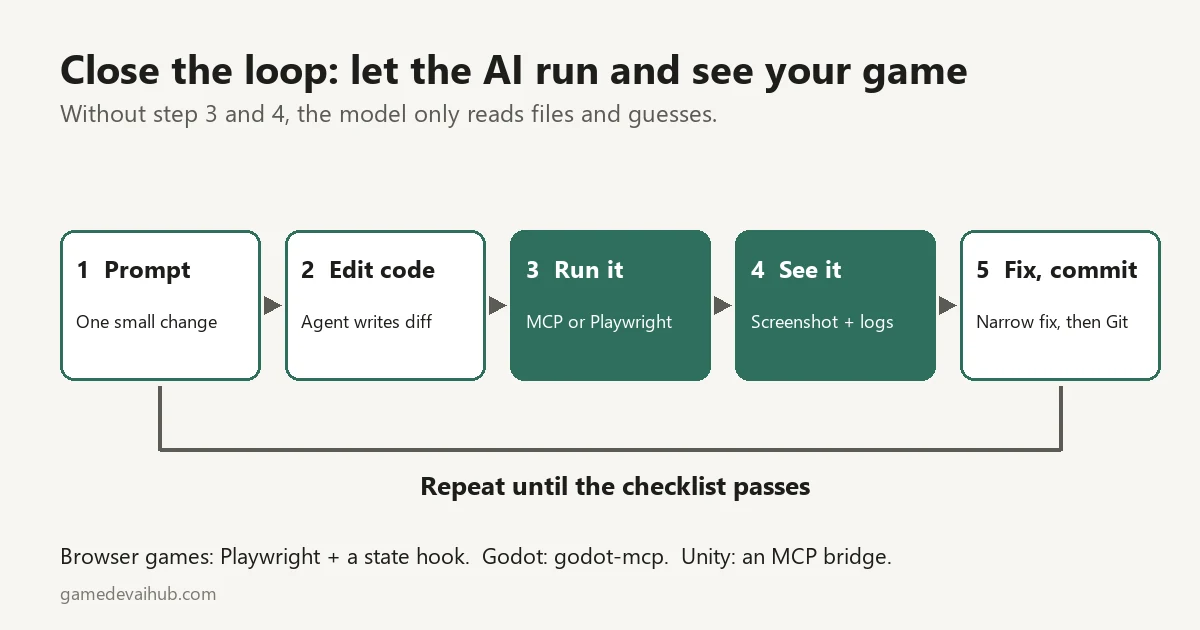
Browser games: drive the game with Playwright and have the agent review screenshots. Expose a small state hook in your game, such as a global that returns score, player position, and game state as text, plus a function that advances time by a fixed step. Tests then repeat exactly instead of depending on frame timing. The open-source game-qa skill from OpusGameLabs follows this pattern for Phaser, canvas, and Three.js. One public experiment sent Playwright through 34 fixed camera positions of a 3D scene and used about 8 million tokens, roughly $33 in API calls (The New Stack). Budget before you let an agent loop on screenshots.
Godot: MCP servers give the agent the same loop. Coding-Solo/godot-mcp installs with claude mcp add godot -- npx @coding-solo/godot-mcp and lets the agent launch the project and read debug output. LeeSinLiang/godot-mcp adds viewport screenshots, which its README marks experimental. I have not stress-tested either, so try them on a throwaway project first. For Unity, see my Claude Code Unity MCP setup guide.
Run this checklist after every feature (adapted from Ziva):
- Test the action and everything it touches. For a weapon: fire, reload, run out of ammo, restart after death.
- Save, then load in a fresh session, not the one that wrote the save.
- Export early. An editor playtest does not prove an exported build works, so test on your target device.
- Hand the build to someone who has not seen it and do not coach them. Write down every failure with the steps that caused it.
- Keep the exact error text and repro steps, ask for a narrow fix, read the diff, and rerun the steps. If you cannot explain what a fix changed, do not stack a new feature on it.
Can you sell a vibe-coded game?#
Yes, with disclosure and clear eyes on the risks.
Steam has required generative-AI disclosure since January 2024. Valve rewrote the form in mid-January 2026 and narrowed it to content players actually consume: AI-generated art, audio, text, and marketing assets in or around your game. AI coding helpers used behind the scenes are exempt, so a vibe-coded codebase on its own does not trigger disclosure. You are still responsible for what your AI systems can show players, and Steam is adding overlay tools for players to report problem content, so a game that generates unchecked content at runtime risks removal (Gigazine summary, Notebookcheck). About 7,818 Steam titles disclosed AI use in the first half of 2025 alone, roughly 20% of that year’s releases. Fill the survey out honestly; it is a legal attestation, and the wording changes, so re-read the Steamworks docs before you submit.
itch.io requires disclosure too and tags projects “AI Generated” or “No AI,” and buyers actively filter on that “No AI” tag, so know your audience.
Ownership is the sharp edge. The US Copyright Office has held that purely AI-generated content with no real human authorship cannot be copyrighted. In plain terms: if your game ships fully AI-generated art with no meaningful human input, a competitor may be able to copy those assets legally. Read the commercial-rights terms on the exact plan you pay for, since they vary by tool and change often. I am not a lawyer, and on real money you want one.
The Vibe Jam: the benchmark for vibe-coded games#
If you want a deadline that forces you to finish, enter the Vibe Jam. Run by indie maker Pieter Levels, it is the closest thing to an annual public benchmark for AI game coding. The 2025 jam drew over 1,000 submissions and required at least 80% AI-generated code, instant browser play, and no login. The 2026 edition raised the AI-code threshold to 90%, recommended Three.js, ran April to May 2026, and closed with 945 games and over 240,000 players.
The Vibe Jam 2026 is settled. The winners went out on June 17, 2026. First place and $25,000 went to A Game About Capybaras Delivering Food by @leocooout, a Rio de Janeiro delivery-driver game that was reportedly built with Claude Code and Three.js. Second place and $10,000 went to Fanto’s Mega-Mart. Third place and $5,000 went to WenWare, which also won Most Played. Twelve special awards followed, including Most Polished (Tiny Skies) and Best Art Direction (Null Range). The launch post advertised $20,000 for gold, so older write-ups quote a smaller pool than the $40,000 paid in main prizes. Every entry is still playable at vibej.am, which makes it the best free library of what vibe-coded games look like in practice.
The deeper lesson from the jam comes from a16z’s own reality check. Investment partner Robin Guo put it bluntly: people acting like they vibe coded a game in two hours as a total non-coder are running “a charade. You can’t just spin up Cursor, input ‘make flappy birds,’ and one shot a game, at least not yet.” His colleague Josh Lu drew the useful conclusion: “If 80% of a game can be vibe coded then the 20% remaining becomes incredibly important.” That 20%, the polish, the feel, the mechanics nobody else thought of, is your job and your edge.
Judge Tim Soret, a game developer, said this year’s entries were far better than last year’s and that some were “getting close to be genuine games.” His estimate: at the current pace, vibe-coded games match a third-year student’s work within roughly six to twelve months, but not the top 20% of developers (full results and judge comments). That remaining gap is taste and polish, which is why Most Polished is an award of its own.
More guides#
Related guides#
- Best Prompts for Vibe Coding Games: 40+ Copy-Paste Prompts (2026)
- AI Game Prototyping Tools: Build a Playable Prototype (2026)
- Claude for Game Development: Build Smarter in Unity, Godot & Unreal
- How to Use AI With Godot 4 (Without Getting Godot 3 Code)
- Claude Code Unity MCP Setup
FAQ#
Can you vibe code a game with no coding experience?#
Can you vibe code a game with no coding experience? Yes, for simple browser games. Rosebud AI and GDevelop’s agent let beginners ship a playable 2D game. You will still hit the 70% wall on anything complex, where reading some code helps a lot.
How long does it take to vibe code a game?#
A simple browser game takes an evening. A polished multiplayer 3D game is more like 20 hours and hundreds of prompts; one developer’s dogfight game took 500 prompts and 20 euros of credits.
What is the best tool to vibe code a game?#
For beginners, Rosebud AI. For developers who want to own the code, Cursor with a rules file. For the fastest browser prototype, Bolt.new. There is no single best, only the right fit for your skill and goal.
Can you make a 3D game with AI?#
Yes. Three.js is the standard for 3D browser games because AI models know it well and deployment is one file. Expect more iteration than 2D and watch for outdated API versions.
Can you vibe code a multiplayer game? #
You can get a prototype, but real-time netcode is the hard limit AI cannot reliably one-shot. Use a managed backend and expect to hand-tune bandwidth and sync yourself.
How do you fix vibe-coded game bugs?#
Commit working builds to Git, revert when a change breaks things, scope prompts small, tell the AI what not to touch, and paste exact errors with screenshots.
Pick one tiny game idea tonight, open Rosebud or Cursor, and ship a playable toy before you go to bed.