by
You could be the first human ever to play the game below.
An AI agent built it from the plan in this guide. Bots played its twin, built in the Godot engine, 4,000 times. No person has played either one, me included.
So try it. A round takes three minutes at most. Then I’ll show you how to make your own, including what broke when we ran these prompts for real.
Dry Kindling
Carry twigs to the fire. Rain soaks what you carry. Last 3 minutes.
Arrow keys or WASD. On a phone, hold and drag. Built by AI, tested only by bots and scripts. No tracking, nothing saved.
Post it in the comments, and say whether it’s fun, unfair or broken.
Tell me how it went in the comments. Give me your twig count and your device. And was it fun? Bots can’t answer that one.
Short answer
Can you make a game with AI if you’ve never coded?
Yes, if it’s small. Expect a playable toy in hours and a finished small game in roughly 21 to 50 hours of work, which is my estimate, because nobody has measured it. AI writes the code. You decide what’s fun and test everything.
Where to start
- Never made a game? Pick your route in 30 seconds.
- Already picked a tool? Go to the seven build steps.
- Have a finished game? Go to publishing.
Can AI really make a whole game?#
No, not by itself.
In GameDevBench, an independent test of 333 Godot tasks, the best agent solved 53.8%, and Roblox’s own benchmark topped out at 51.7%. Newer models scored 15 out of 15 on tiny tasks in a test by Flockbay, which sells on Godot, but nobody has measured a beginner using one over weeks. So plan on your first attempt failing about as often as it works.
We ran our Godot prompts exactly as written, and they produced this:
- The player walked off the screen, because no prompt set the window size.
- Every restart was an instant loss, because the fire’s health survived the restart.
- The game could become unwinnable, because twigs lost in the rain never came back.
- Standing on a twig did nothing until you walked off and back.
None of those showed an error at first. One broken script even finished as if it had succeeded. We saw some of these traps coming and ran the literal prompts anyway, to see what happened. The prompts in this guide are the fixed versions.
So what are your odds?#
Nobody knows. I looked for a beginner finish rate and couldn’t find one. You’ll see numbers like 88% floating around, but the ones we could trace don’t measure finished games.
Real people are shipping though. An accountant put a story game on Google Play, a music producer put a demo on itch.io, and someone with “ZERO experience writing code” built a Steam demo. All of that is self-reported, and most of these games have almost no players yet.
What do you need to know before you start?#
Learn these seven words now and the AI’s answers stop sounding like noise.
| Word | What it means | In our game |
|---|---|---|
| Engine | The program that runs your game. The AI is a separate tool that edits it. | Godot or GDevelop |
| Agent | An AI that can edit files and run commands on your computer, beyond chatting. | The AI that wrote our Godot scripts |
| Scene | A reusable chunk of the game. | The fire, the player, the main screen |
| Event or script | The rules. Events are visual, scripts are code. | “If you touch the fire, add 10 health” |
| Collision | Whether two things are touching. | You reach a twig |
| Game loop | Two meanings: the game redrawing itself many times a second, and the thing the player repeats. | Fetch, feed, repeat |
| Export | Turning your project into something other people can run. | A zip you upload to itch.io |
If you search “game AI”, you’ll find enemy pathfinding tutorials, which are a different topic from using AI to build the game.
Which route should you pick?#
Answer four questions. Your device decides more than you’d expect.
Route finder, 30 seconds
1 of 4: What will you build on?
2 of 4: How old are you?
3 of 4: What do you want most?
4 of 4: When it breaks, would you rather…
The table has the same picks, plus what each route costs you in freedom. These picks are my judgment from docs and reports, and I haven’t tested them with real beginners yet.
| If you… | Use | You give up |
|---|---|---|
| Want the one route whose prompts we ran from scratch | One HTML file + one desktop agent | No editor to drag things in. You describe problems and the AI reads the code |
| Want visible rules and no code | GDevelop | Free AI runs out fast. No named game built with its agent yet |
| Will read errors and want to own everything | Godot + one desktop agent | It’s code. Godot’s tutorial “assumes that you have some programming experience” |
| Want Roblox players | Roblox Studio | You can’t take the game elsewhere. Default release reaches age-checked 16+ only |
| Want a story game | Twine or Ren’Py | Genre-bound, but free and close to plain writing |
| Own a strong gaming PC and care about 3D looks | Unreal with Blueprints, AI as tutor | 32 GB RAM recommended, no web export, little AI help on Blueprints |
Godot isn’t the easy option people say it is. It’s free and light, and what you make is yours. But when the AI fails, you’re reading code.
Be careful with prompt-to-game platforms. They’re fun, but test the exit first. Rosebud’s terms say it “shall own” prompt output. Commercial rights start at $30 a month, and code download at $50. Gambo shut down in May 2026 and its domain is parked. If you can’t export on day one, treat it as a toy. Comparing tools? See our AI prototyping tools guide.
Claude or Codex?#
I couldn’t find a current test where both built the same game. On older models, the one independent benchmark put Gemini and GPT above Claude for Godot. Roblox’s leaderboard puts Claude’s top model first, but that model costs extra on the $20 plan.
So try Codex’s free tier first, because it exists and Claude Code’s doesn’t. Pay about $20 a month only if it stalls. One plan is enough. This research ran on Claude, so I’m not a neutral judge here. For more on each, see what works and breaks in Claude Code and using ChatGPT for game development.
Under 18?
Claude and Cursor consumer plans require 18+. So does Google Play Console. itch.io publishers need to be 18 or have a parent’s consent, and users must be over 13. Under 13? Start with Scratch and a parent. It has no AI route and isn’t for selling. Don’t post your real name, face or school on a game page.
What does it cost?#
It costs little money and a lot of time. Prices are from vendor pages, checked November 1, 2026.
| Route | Cost | The catch |
|---|---|---|
| GDevelop | $7.99/mo Silver, maybe 1 to 2 months | 40 free credits buy about 2 to 4 Build requests on the last rates GDevelop published. Free export works, with its logo |
| Godot + agent | $0 engine, about $20/mo agent | Free agent tiers have limits nobody publishes |
| Roblox | $0 to start | Assistant has a usage limit Roblox doesn’t publish. Reaching all ages needs a subscription or a 1,000 Robux refundable fee |
| Art and sound | $0 | If you use free packs. Free AI output often can’t be sold |
| itch.io | $0 | Takes a share only if you sell, default 10% |
| Steam | $100, recouped after $1,000 | 21-day wait, plus tax and ID checks |
| Google Play | $25 | 12 testers for 14 days on new personal accounts |
The real totals I found are all self-reported. One first-timer spent $45 including the Google Play fee. A non-technical writer spent about $106 and 40 hours on one playable level.
That first-timer also reported that “building took 3 days and fixing took 14.” Budget your time like that.
No credit card? GDevelop Free plus a free itch.io game should work, though I haven’t confirmed the sign-up flow. Google Play won’t take a prepaid card. Our free AI tools list has more options.
How do you set up an undo before you build?#
Do this first, because AI agents break things that worked. One beginner says breaking something with no way back “can happen often when you vibe code”, meaning when you build by prompting without reading the code.
- Make one folder for this game. Keep passwords, API keys and personal files out of it.
- Save a checkpoint. On Godot or web, install GitHub Desktop and commit (save a checkpoint) after every feature that works. On GDevelop’s free plan there’s no version history, so copy the project to a dated folder.
- Break it on purpose. Delete something, then go back. If you can recover in five minutes, you’ve learned the most useful skill in this guide.
- Put a blank game online on day one. Use gd.games or an itch.io Draft page. That way you meet publishing problems early.
Copeland’s free GitHub Desktop walkthrough teaches this with no terminal, and it warns you that discard can’t be undone.
Is it safe to let an AI agent run on your computer?#
Mostly, if you set it up right. Claude Code starts in auto mode, where a classifier approves actions for you. On native Windows it runs commands without a sandbox, the wall that keeps a program inside one area of your computer. Codex has a native Windows sandbox, and that’s a point in its favor.
- Start the agent inside the game folder, never your home folder.
- Commit before every request.
- Never use modes that skip permission checks, however many tutorials tell you to.
- Decline any download, any
sudo(admin) command, and any delete outside the folder. - Don’t let it read random README files from asset packs. Text in them can give it instructions.
We learned why the hard way. A Godot --import command during our test overwrote the real editor settings, and there was no backup. Some Godot commands change settings for your whole computer.
What should your first game be?#
Smaller than you want. Aim for one screen and under three minutes.
Some people do ship big first projects with AI. A person who has never written code reports a multiplayer pirate game in a month, still in beta. But most failures never post, so you mostly see survivors. A vibe-coded metroidvania is one that did. It died at about 40 hours once its systems started tangling.
Tiny is my judgment, and I can’t prove it. But it gives you a finish, and the finish teaches you what a second game needs. Our game MVP guide goes deeper on starting small.
| First game | Why it works | Rough hours (my estimate) |
|---|---|---|
| One-screen collect and dodge | No levels to fill, each piece is testable | 8 to 25 |
| One-button arcade | Fewest systems, though it can look like a clone | 5 to 15 |
| Endless runner | Spawners and a score chase | 8 to 20 |
| Clicker | No physics, can be one HTML file | 6 to 20 |
| Short platformer | Most official tutorials cover it | 15 to 40 |
Avoid Sokoban and match-3 as “easy” starters. In Al Sweigart’s test, one model handled Asteroids and Tetris but failed Sokoban and Bejeweled. That’s one test of one model, but it runs against what you’d guess.
Why won’t AI remake your favorite game?#
Because of a new rule, and because it was a bad plan anyway. Anthropic confirmed Claude Code on Opus 5.5 now steers away from “a recreation of a specific existing game, even if it is renamed or called original.” I found no equivalent rule in other tools. But switching tools doesn’t change your risk.
itch.io prohibits projects that “mimic the look, feel, or functionality of another creator’s work without permission.” Nintendo has taken down free fan projects for years, including a fan-game tool. Game ideas aren’t protected, but the specific way a game expresses them is.
So don’t reword the prompt. Change the rules, write them down, then ask the AI to build your rules. A monster-collecting game is fine. Pokémon isn’t.
What’s the game we’ll build?#
Dry Kindling, the game at the top of this page. You tend the last campfire in a rainy forest. The theme is familiar, and Campfire has a similar loop. Our rule mix is our own, as far as a quick search shows.
| Design doc | |
|---|---|
| Loop | Spot a twig, carry it (slower), dodge rain warnings, feed the fire |
| Win | Fire survives 180 seconds: “Dawn” |
| Lose | Fire hits 0 |
| Won’t have | Enemies, levels, inventory, upgrades, saves, online scores, story |
| Done means | A stranger opens the link, gets it without help, and reaches win or lose in two browsers |
That “won’t have” row is the most useful line in the doc. Write yours first, then point to it whenever the AI wants to add more.
How do you talk to AI so it works?#
Tell it what it can’t see, and give it a way to check its work. Anthropic’s guidance comes down to that, and the same idea shows up in OpenAI’s. Seven habits do most of the work:
- Name the engine and version. “Godot 4.7.2”, every session. It mixes up old versions otherwise.
- Ask for one thing. One mechanic per request.
- Ask for a plan first. “List the nodes and files, then wait for my OK.”
- Say what not to touch. “Change nothing else.”
- Ask how to test it. “Tell me how to check this in 30 seconds.”
- Paste exact errors, with your steps. Say what you did and what you expected.
- Restart after two failed fixes. A third correction adds to a conversation already full of failed attempts.
Vague: the AI guesses
Make the player move and add some enemies and a score.
Specific: you can test it
Godot 4.7.2, GDScript. Add a Keeper scene using CharacterBody2D with a visible colored shape. Use input actions for arrow keys and WASD. Keep the whole body on screen at 1280×720. List the nodes, wait for my OK, then build. Change nothing else.
Write in your own language if that’s easier. Use its normal writing system, and keep error text exact.
You can also write down what it forgets. The accountant from earlier keeps “One main document with every decision and change. The AI forgets, the document doesn’t.” More prompts are in our prompt library.
How do you build it, step by step?#
Tick off these seven milestones as you go, and your progress saves in this browser. Hours are my estimate for a first-timer, with no allowance for bad days.
The browser prompts are the tested ones. A fresh AI agent, running on Claude, got them one at a time in an empty folder, and we tested the finished build in Chrome with scripted key presses. An earlier run exposed gaps, such as no instructions for new players, so we fixed the wording and ran it again from scratch. The zip and the itch.io upload weren’t part of that test.
The Godot prompts carry fixes that passed when an agent ran them, but the final wording hasn’t been re-run from scratch. The GDevelop prompts have never been run. No beginner has tried any of them, so you may be the one finding the next bug. Tell me.
Prompts and test (1 to 3 hours)
Goal: A live link before any game exists.
Browser prompt (an agent ran this from scratch)
Create index.html in this folder as one file: plain HTML, CSS and JavaScript, no libraries and no build step. Draw a 1280x720 canvas that scales to fit the browser window and keeps its shape. Show a dark background and a small title, 'Dry Kindling', at the top. Write AGENTS.md saying: one file, no libraries, every gameplay number lives in a settings object at the top. Save the design document below as GDD.md: [PASTE]. Tell me how to open the game, and how to zip it for itch.io. Say which steps you could not verify.GDevelop prompt (never run)
I am new. Before I build anything, explain in 5 short bullets what a scene, an object and an event are in my empty project. Change nothing.Godot prompt (fixes passed, final wording not re-run)
Godot 4.7.2 Standard, GDScript, Compatibility renderer, web target, no C#. If no project exists, create one. Set the viewport to 1280x720, stretch mode canvas_items, aspect keep. Create one scene with a dark background and a Label reading 'Dry Kindling'. Set it as the main scene. Write AGENTS.md recording these facts, and save the design document below as GDD.md: [PASTE]. Check whether 4.7.2 export templates are installed. Give me the exact clicks to install them and to export for web. Say which steps you could not verify.Test it: Open your gd.games link or itch.io Draft page in a private window. You see the title.
Prompts and test (30 to 90 minutes)
Goal: Eight-way movement that stays on screen.
Browser prompt (an agent ran this from scratch)
Add a Keeper, a small colored square that starts to the left of the screen center. Arrow keys and WASD move it in 8 directions at a speed from settings, using delta time, and diagonals must not be faster. Keep the whole square on screen at 1280x720. Stop the arrow keys from scrolling the page, and release all held keys if the window loses focus. List what you will add, wait for my OK, then build. Change nothing else.GDevelop prompt (never run)
Add object Keeper using a placeholder sprite. Use top-down movement so arrow keys and WASD move it in 8 directions, and keep it inside the 1280x720 screen. Change nothing else.Godot prompt (fixes passed, final wording not re-run)
Add a Keeper scene using CharacterBody2D in floating motion mode, with a collision shape and a visible colored Polygon2D. Use input actions for arrow keys and WASD. Speed lives in settings.gd. Keep the whole body on screen at 1280x720. List the nodes, wait for my OK, then build.Test it: Walk into all four walls and corners. You can't leave the screen, and diagonals aren't faster.
Prompts and test (1 to 2 hours)
Goal: The game's first state: carrying or not.
Browser prompt (an agent ran this from scratch)
Add a twig, a small brown bar, at a random spot, staying out of the top 100 pixels. Each frame, check whether the Keeper overlaps it, so a change of state while touching still counts. If the Keeper isn't carrying: remove the twig, set carrying to true, drop speed to 70%, and draw a small twig above the Keeper. Tell me how it detects the touch.GDevelop prompt (never run)
Add object Twig placed at a random spot. Add boolean variable Carrying on Keeper. When Keeper touches Twig and Carrying is false: delete Twig, set Carrying true, reduce speed to 70%. Show me the events you made and explain each.Godot prompt (fixes passed, final wording not re-run)
Add a Twig scene with Area2D at a random spot. Each physics frame, check get_overlapping_bodies(), not only body_entered, so a change of state while touching still counts. If the Keeper is not carrying: free the twig, set carrying true, use carry speed from settings, show a small colored Polygon2D above the Keeper (no images exist yet). Tell me how it detects the touch.Test it: Touch the twig: it vanishes and you slow down. Restart or reload, and repeat three times.
Prompts and test (1 to 2 hours)
Goal: The loop works and gives a score.
Browser prompt (an agent ran this from scratch)
Add a fire at the center of the screen, plus fireHealth (start 60, max 100) and twigs delivered. When the Keeper touches the fire while carrying: add 10 to fireHealth up to 100, add 1 to twigs delivered, stop carrying, restore speed, and create a new twig at a random spot. Start with 3 twigs on screen, and never spawn one on top of the fire. Show fireHealth and twigs delivered as plain text.GDevelop prompt (never run)
Add object Fire at screen center, scene variables FireHealth (start 60, max 100) and Twigs. When Keeper touches Fire and Carrying is true: add 10 to FireHealth up to 100, add 1 to Twigs, set Carrying false, restore speed, and create a new Twig. Keep 3 twigs on screen. Show FireHealth and Twigs as debug text.Godot prompt (fixes passed, final wording not re-run)
Add a Fire Area2D at the center and a GameState script with fire_health (start 60, max 100) and twigs. When the Keeper touches the Fire while carrying: add 10 up to 100, add 1 to twigs, stop carrying, restore speed, create a new twig at a random spot. Start with 3 twigs. Show fire_health and twigs as debug text. Add a plain test, a script extending SceneTree, for the health cap. Use load(), not preload. It must quit with a non-zero code on failure and have a watchdog. Give me the exact command to run it.Test it: Deliver 5 twigs: score shows 5, health never passes 100. A second twig does nothing while you're carrying.
Prompts and test (90 minutes to 3 hours)
Goal: Win, lose and restart. This is your first shippable build.
Browser prompt (an agent ran this from scratch)
The fire loses 1.2 health per second using delta time. Add a 180-second countdown, a fire bar labeled 'Fire' and a result screen: 'Dawn' with twigs delivered, or 'The fire went out' with twigs and time survived. Enter restarts. Before the first round, show a start screen with these rules: move with arrow keys or WASD, carry twigs to the fire, keep the fire alive for 3 minutes. The round starts on Enter or a click. Every value must reset on restart. Decay must not depend on framerate. Explain delta in one sentence.GDevelop prompt (never run)
Reduce FireHealth by 1.2 per second using TimeDelta. Add a 180-second countdown. If FireHealth reaches 0, go to a Lose scene; at 0 seconds go to a Win scene. Each shows Twigs and restarts on Enter. Add a fire health bar and a timer as text.Godot prompt (fixes passed, final wording not re-run)
Fire loses 1.2 per second using delta. Add a 180-second timer, a HUD with a bar and text, and a result screen: 'Dawn' with twigs delivered, or 'The fire went out' with twigs and time survived. Add Enter as an input action to restart. Every value must reset on restart, including anything in an autoload. Decay must not depend on framerate. Explain delta in one sentence.Test it: Do nothing and lose. Set the timer to 10 seconds and win. Restart five times in a row: nothing left over.
Prompts and test (2 to 4 hours)
Goal: The one real hazard. Expect this to be the hardest step.
Browser prompt (an agent ran this from scratch)
Plan only. I want rain columns: pick one of 5 screen columns; show a warning stripe for 1.5 s; then pour for 1.0 s; if the Keeper is inside while carrying, the twig is lost; if the Fire is in the column, Fire loses 8. First rain at 6 s, then one every 6 s. The fire loses 8 once per pour. The Keeper is inside if its center is in the column. A lost twig is replaced at a random spot, and the Keeper's speed is restored, so the map can never run out of twigs. Rain must reset on restart. Add one line about rain to the start screen. List the state, timers and order of events. Wait for approval.GDevelop prompt (never run)
Plan only. I want rain columns: pick one of 5 screen columns; show a warning stripe for 1.5 s; then pour for 1.0 s; if the Keeper is inside while carrying, the twig is lost; if the Fire is in the column, Fire loses 8. First rain at 6 s. The fire loses 8 once per pour. A lost twig is replaced at a random spot, so the map can never run out of twigs. List objects, variables, timers and order of events. Wait for approval.Godot prompt (fixes passed, final wording not re-run)
Plan only. I want rain columns: pick one of 5 screen columns; show a warning stripe for 1.5 s; then pour for 1.0 s; if the Keeper is inside while carrying, the twig is lost; if the Fire is in the column, Fire loses 8. First rain at 6 s. The fire loses 8 once per pour. The Keeper is inside if its center is in the column. A lost twig is replaced at a random spot, so the map can never run out of twigs. List nodes, scripts, timers and order of events. Wait for approval.Test it: Stand in a column carrying: you lose the twig. Stand empty-handed: nothing. It never rains without a warning. Then build one step at a time: stripe, then pour, then effects.
Prompts and test (1 to 2 hours)
Goal: Starts easy, ends hard, and you can tune it by hand.
Browser prompt (an agent ran this from scratch)
Move every gameplay number to the settings object, with comments. Rain interval goes from 6 to 2.5 s and decay from 1.2 to 2.4 across 180 s, by elapsed time. Replace the plain debug text with 'Twigs: N', and keep the fire bar and a countdown on screen.GDevelop prompt (never run)
Rain interval should go from 6 s to 2.5 s across 180 s, and decay from 1.2 to 2.4. Put the start and end numbers in clearly named variables so I can edit them by hand.Godot prompt (fixes passed, final wording not re-run)
Move every gameplay number to settings.gd as named constants with comments. Rain interval goes from 6 to 2.5 s and decay from 1.2 to 2.4 across 180 s, by elapsed time. Remove or hide debug text outside debug builds.Test it: Get a few people to play at least 10 runs between them, and write down wins. Change a number yourself at least twice.
Commit or copy your project after every milestone. After M5, you have a complete, ugly game. If rain defeats you, ship that: no rain, and the fire burns down faster.
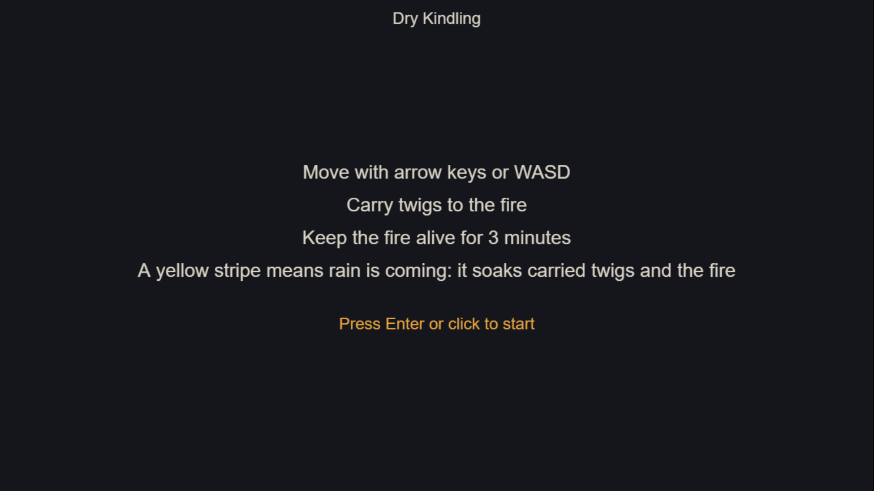
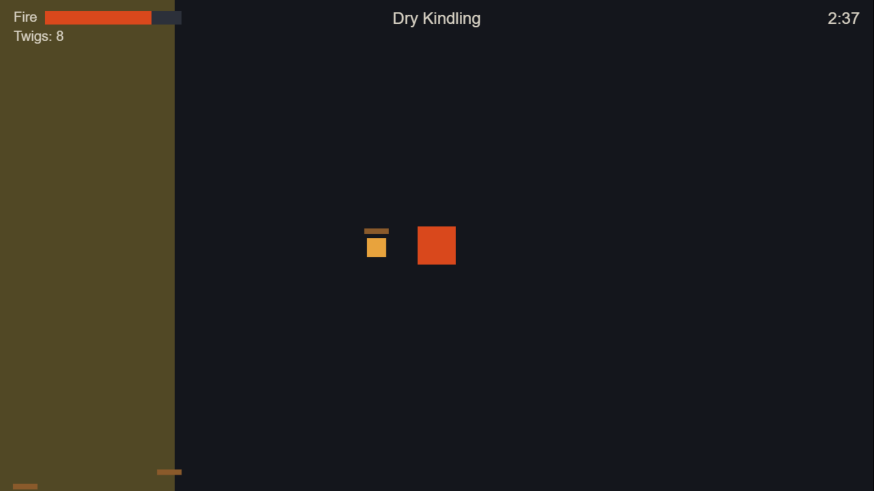
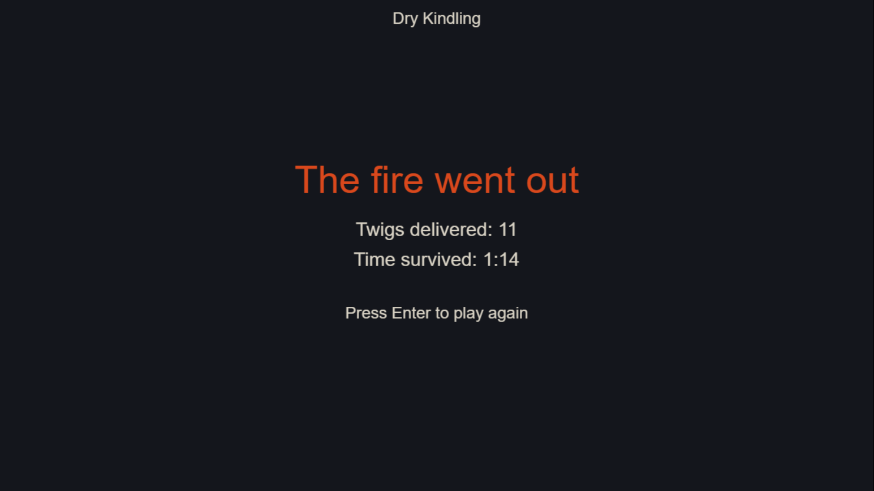
You now have roughly the game at the top of this page, with no sound. Don’t polish yet. The next two sections will save you more time than any feature.
How do you know it works?#
You play it. Don’t take the AI’s word for it, because “Claude stops when the work looks done”, in Anthropic’s own words. If it has nothing to run, “looks done” is all it has.
That’s why it keeps saying it’s fixed. So never accept the word “fixed”. Ask what it ran, then replay the steps yourself. In one video tutorial, an AI’s test passes on screen while the feature is broken.
Use a test card#
Roblox’s guide tests each round against named parts of the game, like Hazards and Win zone. Copy that with this card for any feature:
- Do the action once, then try it again immediately.
- Try everything it touches. Add a twig, then check the score and the fire.
- Restart five times. That’s where our fire-health bug hid.
- Close it and reopen it.
- Run the exported build as well as the preview.
- Watch one person play without helping.
If you don’t code, ask the AI for a cheat menu that jumps to any moment, so you can test the end without playing for three minutes. And ask it to write tests for rules like “health never goes over 100”, then break the rule on purpose to prove the test can fail. GDevelop’s AI can write and run gameplay tests, though that feature is experimental.
Is the code any good?#
You can’t fully tell, and for a tiny game you don’t need to. The warning sign is each fix taking longer than the last. These checks may help, but we haven’t proven them:
- Open a fresh session. Can it make a small change without breaking anything?
- Ask it to explain the layout. Does that match your design doc?
- Ask a second AI to list only problems a player would notice.
Fix those and ignore style complaints. A reviewer asked to find problems will always find some.
What do you do when it breaks?#
First work out what happened. Either the game runs but does the wrong thing, a script crashed, or it’s stuck waiting. Then read the message. Most guides say to paste it back to the AI, and that does work. But try reading it first.
These are real errors from our test build. Guess before you open each one.
Score: 0 of 5
The "onready" keyword was removed in Godot 4. Use the "@onready" annotation instead.Show the answer
The AI wrote old Godot 3 code. Godot usually names the fix. Tell the AI your exact version and paste the line. Not all old-code errors are this clear: an old .instance() call gives a much vaguer one.
Invalid assignment of property or key 'visiblee' with value of type 'bool' on a base object of type 'Polygon2D'.Show the answer
The AI invented or misspelled a name. Note the extra e. Godot’s --check-only check missed this: it only failed when that line ran. So a clean check doesn’t prove the AI’s names are real.
ERROR: Can't change this state while flushing queries. Use call_deferred() or set_deferred() to change monitoring state instead.Show the answer
Something changed in the middle of a physics step. Our twig spawned from inside a collision signal. Godot tells you the fix: do it a moment later with call_deferred(). The game kept running, so this one is easy to ignore.
SCRIPT ERROR: Compile Error: Identifier not found: GameStateShow the answer
Maybe nothing: the checker doesn't load your global scripts. In our test this was a false alarm. The game ran fine, but --check-only fails on autoload variables. Run the game before you let the AI “fix” working code.
No export template found at the expected path:Show the answer
You haven't installed the export templates. Your game is fine. Install them through Editor, then Manage Export Templates. The error names the missing files but doesn’t say how to get them.
GDQuest’s error guide teaches a proper five-step method, and it warns that the highlighted line may not be where the cause lives. It assumes you know basic GDScript.
What if there’s no error at all?#
Those were our worst bugs. For silent ones, say what you did and what you expected, and write “no error appeared”. Then ask for temporary print lines tagged TEMP_DEBUG. They write to the log so you can see inside the game, and the tag makes them easy to remove.
When should you stop asking the AI?#
| If this happens | Do this |
|---|---|
| Two fixes failed | Clear the session. Rewrite the prompt with what you learned |
| It re-breaks something it fixed | Add the decision to your project doc |
| It stopped halfway (limit or outage) | Play the game first. If it’s broken, go back to your last commit |
| You can’t explain the last fix | Don’t stack another feature on it |
| You’ve been stuck two days | Cut the feature or ask a person |
Where can you ask for help without getting flamed?#
Some places dislike AI projects. One r/godot post saying AI games “don’t belong” hit 1,918 points, with replies split. That’s one member’s view, and I couldn’t read the current subreddit rules.
The GDevelop forum and Godot forum have no AI rule in their FAQs. Write in your own words and say AI wrote the code. Paste the small part that’s failing and the error, so people can see you tried.
How hard should your game be?#
Harder to judge than you think. We had bots play the Godot build 4,000 times, because that’s what you can do when nobody can play it. These skill levels are my assumptions.
| Fire loses per second | Perfect bot | Careful | Decent | Slow | First-timer |
|---|---|---|---|---|---|
| 1.20 to 2.40 (this guide’s setting) | 100% | 99% | 99% | 54% | 0% |
| 1.35 to 2.70 | 100% | 95% | 76% | 6% | 0% |
| 1.50 to 3.00 | 99% | 81% | 43% | 1% | 0% |
| 1.65 to 3.30 | 99% | 44% | 7% | 0% | 0% |
| 1.75 to 3.50 | 95% | 16% | 1% | 0% | 0% |
In the Careful column, going from 1.50 to 1.65 takes wins from 81% to 44%, so no single setting suits everyone. Rain barely moved the numbers. A perfect bot ignoring rain still won 95%, so for skilled play the fire’s burn rate decides this game.
The game above and the prompts use the easiest row. The First-timer bot still loses at every setting, so you might too. If you do, tell me how far you got.
So keep your numbers in one settings file, change them by small steps, and test with more than three plays. Three plays can’t tell 1 in 3 from 1 in 2. And AI can’t tune this for you, because it doesn’t know how the game feels. “Juice It or Lose It” and “The Art of Screenshake” are the classic talks on making actions feel good, and I haven’t watched them yet.
Can you use AI art and music in your game?#
Yes, but read your plan’s terms first. Free AI output is often not yours to sell. For a first game, use human-made packs. They’re free and they match.
Type a tool name below to check it. Terms change, so save a copy of them on the day you generate anything.
| Tool | Free output in a sold game? | The catch |
|---|---|---|
| Kenney Art, audio, fonts | Yes, CC0 | No credit needed. Terms |
| Poly Haven, ambientCG Textures, models | Yes, CC0 | Realistic style |
| ChipTone, jsfxr Retro sound effects | Yes | ChipTone is CC0 |
| OFL fonts Fonts | Yes | Keep the license file. Can’t sell the font alone |
| Quaternius 3D models | Yes, own license | No longer CC0. Don’t redistribute raw files |
| Pixabay Music, sound | Yes, check it | No attribution. Watch for third-party rights |
| Freesound Sound | Per file | CC BY needs credit. BY-NC can’t be sold |
| game-icons.net Icons | Yes, with credit | CC BY 3.0 |
| Mixamo Rigging, animation | Yes | Humanoids only. Rests on a 2022 staff post. Don’t redistribute raw files |
| Retro Diffusion Pixel art | Yes, per its FAQ | Pay per image. Full terms not read |
| PixelLab Pixel art | Yes, per its terms | Small trial. Price not confirmed |
| Meshy 3D models | Yes, with credit | On free, Meshy owns it, CC BY 4.0. Paid customers own output |
| Leonardo Images | Yes, but public | Others may reuse free images. Terms blocked to us |
| Adobe Firefly Images | Firefly models only | Partner models aren’t covered |
| Gemini images Images | Unclear | Google “won’t claim ownership”, but no explicit commercial grant found |
| ChatGPT images Images | Likely yes | From a third-party copy of the terms. Check it yourself |
| Tripo 3D models | Treat as no | Sources conflict and official terms blocked to us |
| Sloyd 3D models | Treat as no | Pricing and terms disagree |
| Scenario 2D, textures | No | Free is “personal and evaluation use only”. Paid is commercial |
| Suno Music | No | Paid assigns rights, but with no promise copyright exists. Live label lawsuits |
| ElevenLabs Voice, music, sound | No | Paid is commercial. Music has an indie game clause under $500,000 revenue. Never clone a voice without consent |
| AIVA Music | No | Only Pro gives full monetization and copyright |
| Udio Music | No | Downloads are disabled, so you can’t put it in a game |
| Cascadeur, DeepMotion Animation | No | Commercial use needs a paid plan |
| Rosebud Whole games | No | Commercial from $30. Its terms say it owns prompt output |
| Hunyuan3D 3D models | Not everywhere | License excludes EU, UK and South Korea |
| DaFont Fonts | Check each | Its license label is “just an indication” |
Checked November 1, 2026, mostly on vendor pages, and some through third parties. Not legal advice.
Use AI art when no pack has what you need. Lock the style before your second asset, and test three pieces in the engine. One builder reuses the same reference images and style text in every prompt. Our pixel art comparison, free AI art tools guide and AI music comparison go deeper.
Do you own it? The US Copyright Office says “prompts alone do not provide sufficient human control” to make you the author. So others may be able to reuse your raw AI sprites. Your edits, writing and arrangement are what you can protect. This isn’t legal advice, and that view isn’t binding law.
What goes in your credits?#
Whatever your licenses require, and it’s little work. Godot needs its license text available, and a link in your credits is enough. Open Font License fonts can be bundled but not sold alone, so keep the license file. Skip fonts marked “free for personal use”. Keep one log with each file, source, license and date.
Copy a credits template
Our wording, not reviewed by a lawyer. Adapt it, and keep a real copy of each license file in your build.
[Game title], made by [you].
Built with [Godot Engine | GDevelop | Phaser].
[Godot] License: godotengine.org/license. Third-party notices in COPYRIGHT.txt.
[GDevelop] GDevelop runtime, MIT license: [paste notice].
[Phaser] Phaser, Copyright (c) [year] Richard Davey, Phaser Studio Inc. MIT license: [paste notice].

Art: "[Pack]" by Kenney (kenney.nl), CC0.
Model "[name]" generated with Meshy (meshy.ai), free plan. Owned by Meshy, CC BY 4.0. Modified: [what you changed].
Sound: "[title]" by [author], [URL], CC BY 4.0. Modified: trimmed.
Font: [Name], Copyright [holder]. SIL Open Font License 1.1, see OFL.txt.

AI tools used: [tool] for [code | text | images]. Designed, tuned and tested by [you].How do you publish your game?#
Start with itch.io. It’s free, and a browser game avoids the scariest warning a beginner’s game can trigger.
- Export for web. In Godot, install the export templates first, because both web templates are required. Leave the threads option off.
- Zip it with
index.htmlat the top level. itch.io allows up to 1,000 files and 500 MB. Filenames are case-sensitive. - Create the page as a Draft. Set kind to HTML and tick “played in browser”. Set viewport to 1280×720.
- Fill in the AI Disclosure section. It covers code, graphics, sounds and text. Then say in your description what you designed and tuned.
- Decide on Mobile Friendly. If you only support keyboards, leave it unticked.
- Keep Click to play on, and add a Start button. Browsers block sound until a click or key press.
- Test in a private window and a second browser. Then set it to Public.
Don’t go Public early. A public page “should be ready for everyone to see”, and it “can not be put on the top of the Most Recent page again.” You get one launch slot.
Can itch.io hide your AI game?
Its guidelines say it may remove from browse and search “Games or projects that are predominantly created by algorithms or AI with minimal human intervention.” An admin said in 2024 there’s “no top-level filtering or penalizing”, and I found no case against a single game. But tag honestly and show your work. Designing the rules and tuning the numbers yourself is your best defense.
What about Steam, phones and Roblox?#
| Store | Pay | What stops beginners |
|---|---|---|
| Steam | $100 | Disclosure covers shipped content players consume. Its form says “Efficiency gains through the use of these tools is not the focus” and never mentions code. No ad-based models |
| Google Play | $25 | 18+, ID checks, 12 testers for 14 days, and a privacy policy even if you collect nothing |
| App Store | $99/yr | Privacy policy required. Template-like games risk rejection as spam |
| Roblox | $0 | Reach is 16+ until you pass age checks, 2FA, a fee or subscription, and an engaged-play threshold (250, announced to fall to 100) |
| Game jams | $0 | Rules vary. GMTK bans AI art and audio, Brackeys bans AI content. Check first |
Avoid desktop downloads for now. Unsigned Windows games show “Windows protected your PC” and must rebuild reputation with every update. Unsigned Mac exports get blocked by Gatekeeper. Web skips both.
Skip ads too, both kinds. In-game ads bring consent and privacy duties, and the accountant’s players said they hate forced ones. Paid ads may not pay back either. An engineer with 10 years’ experience spent about $300 on Meta ads and got about $60 back.
A free game on itch.io needs no forms. Your first sale brings a tax interview and payout setup. You don’t need a company. If real money arrives, ask a local accountant.
How do you get your first players?#
I found no good data on this, so here’s my judgment. Enter one jam that allows AI and post one devlog per milestone. Then make one honest post with a playable link, and say you used AI before someone else does.
Will people hate your game because you used AI?#
Some will. In one study of 508,192 Steam reviews, AI-tagged games were recommended 68.4% of the time, against 86.3% for procedural-generation games. Reviews that mentioned AI were positive 49.5% of the time. But that comparison isn’t against games in general, and low-effort games may drag the number down.
Attention is thin too. On itch.io, about 12% of AI-tagged games appear on its rated list, against about 19% of all games. On Steam, about 29% of AI-tagged games have 10 or more reviews. Neither number says why, or how many people gave up before publishing.
Replies to beginners can be brutal. “You didnt make anything here” is a real one. But one commenter pushed back that most people they talk to “couldn’t care less about how the sausage is made as long the sausage is good.”
You can’t control that, but you can disclose honestly and keep obvious AI out of your cover art. See our player reaction data and Steam disclosure guide.
And expect no money. In mid-December 2025 about 49% of that year’s Steam releases had under 10 reviews, though late-year games had little time. By January 2026, 2.99% had reached 1,000. Ignore any book that promises non-coders $50K a month without evidence.
What should you do after your first game?#
Decide what you’re after, because it changes what you hand to the AI. In a 52-person experiment, developers learning with AI scored about 17% lower on a quiz than those without it. The researchers’ look at usage patterns hints that asking for concepts beats delegating, but those groups were tiny.
| Task | If you want to ship | If you want to learn |
|---|---|---|
| Writing code | Delegate | Write one small thing yourself each session |
| An error | Paste it, test the fix | Read it and explain it back first |
| Design and scope | Do it yourself | Do it yourself |
| Balance and feel | Do it yourself | Do it yourself |
| Testing | AI writes tests, you play | Same |
To learn properly, try Unity Essentials, which says no experience is needed, or GDQuest’s course. Make game two one step bigger. A 20-hour limit per project is a good rule from the 20 Games Challenge.
Going deeper with AI? See our vibe coding walkthrough, AI with Godot, Claude Code with Unity and Godot MCP servers.
Your next five minutes: play one round and post your twig count in the comments. Then write your “won’t have” list.
Quick answers to common questions#
Can I make a game with AI for free?#
Yes, for a small one. Godot, itch.io and free asset packs cost nothing, and free AI tiers can write a one-file browser game. Limits are low and unpublished on most plans, so a bigger project usually needs about $8 to $20 a month. Free output from many AI art and music tools can’t be sold.
How long does it take to make a game with AI?#
A toy takes hours. A small finished game likely takes 21 to 50 hours over 4 to 8 weeks, including learning. That’s my estimate, because nobody has measured beginners. Expect fixing to take longer than building. One first-timer reported 3 days building and 14 days fixing.
Which AI is best for making a game?#
Pick your route first. No current test has compared the main agents building the same game, and benchmarks disagree. Start with a free tier such as Codex. If you’re under 18, avoid Claude and Cursor consumer plans, which require 18+.
Can you make a Roblox game with only AI?#
You can get far with Roblox Assistant, and Roblox has an official guide for people with no experience. But expect to test and fix things, and Roblox doesn’t publish its usage limit. Your game stays on Roblox, and default release reaches age-checked users 16 and over.
Can I sell a game I made with AI?#
Usually, if your AI tool’s plan allows commercial use, you meet your store’s rules, and the game doesn’t copy an existing one. Raw AI output may not be protected by US copyright, so others might reuse it. This isn’t legal advice.
Can I make a game on a Chromebook or phone?#
GDevelop says its web app works on a Chromebook, and that’s the one full route I found. We haven’t tested it. Godot’s web editor can’t export, and Roblox Studio is Windows and Mac only. On a phone, prompt-toy apps are fun, but I found no verified full route. Borrow a computer to own the result.
Is Google Genie a game maker?#
No. Project Genie is a research prototype that generates a short explorable world, for Google AI Ultra subscribers. A Google spokesperson reportedly said it isn’t a game engine. You can’t publish a game from it. For Google’s tools, AI Studio’s Build mode is closer.
Do I have to tell people I used AI?#
On itch.io and Steam, yes for content in the game. itch.io asks you to tag AI use, including code. Steam’s form covers shipped content players consume, and doesn’t mention code. Many jams have their own rules. Tagging honestly also beats being called out later.
How was this guide tested, and what wasn’t?#
Checked November 1, 2026. Prices and rules change, so check the linked pages.
- An AI agent built Dry Kindling in Godot 4.7.2 and for the browser, and ran tests and bots on it. The version above is the browser build, tested only by a bot and scripts.
- We didn’t run GDevelop, Roblox, Unity, web export from Godot, an itch.io upload or any paid plan. No human has played the game, and no beginner has followed this guide yet.
- Numbers come from the linked sources, many of them vendors or self-reports. Hours and route picks are my judgment.
- AI agents did the research and testing and drafted this page, running on Claude, which is why I’d have someone else check my Claude vs Codex call.
- This page has no affiliate links, and no tool paid for a mention.
| Date | Who | What happened |
|---|---|---|
| Nov 1, 2026 | AI agent | Built the game in Godot 4.7.2 and for the browser. Bots played the Godot build 4,000 times |
| Nov 1, 2026 | Two fresh AI agents | Ran the browser prompts from scratch. The first run exposed gaps, so we fixed the wording and ran it again. Movement, walls, carrying, rain and restart then passed scripted tests in Chrome |
| Next | You | Post your result in the comments, and I’ll add it here |
If something here is wrong or out of date, say so in the comments and I’ll fix it.